---
schema_version: "1"
id: de1ea97f12f0d02bbb099c82559c5276d7edca8af0791115e8c460b4f340fa34
title: Share Attachments
collection: admin
version: current
locale: en-us
portal_url: https://docs.salesforce.com/admin/current/en-us/ind/264-0-0/cg_task_share_attachments_offlineapp.md
canonical_url: https://help.salesforce.com/s/articleView?id=ind.cg_task_share_attachments_offlineapp.htm&release=264.0.0&type=5
source_site: help.salesforce.com
content_type: documentation
content_hash: e0617e42e4fa7868fed1eae69119fdac4298bbdf4e2e42d14a14a71dced3a031
description: You can share PDF, XLS, and DOCX files from your Consumer Goods Offline mobile app using the Sharing button on the Attachment tab.This feature applies only to iOS users.
products:
  - Consumer Goods
release: "264"
---
# Share Attachments

You can share PDF, XLS, and DOCX files from your Consumer Goods Offline mobile app using the Sharing button on the Attachment tab.This feature applies only to iOS users.

### Required Editions

<table class="slds-table slds-table_bordered slds-max-medium-table_stacked slds-m-bottom_small edition"><colgroup><col></colgroup><tbody><tr class=""><td class="slds-cell-wrap" style="vertical-align:top;">Available in: Lightning Experience in <strong>Professional</strong>, <strong>Enterprise</strong>, and <strong>Unlimited</strong> Editions that have Consumer Goods Cloud enabled</td></tr></tbody></table>

<table class="slds-table slds-table_bordered slds-max-medium-table_stacked slds-m-bottom_small ">
        <colgroup>
          <col style="width:50%">
          <col style="width:50%">
        </colgroup>
        <thead class="slds-text-title_caps ">
          <tr class="">

            <th scope="colgroup" class="slds-cell-wrap" colspan="2" style="vertical-align:top;" id="d4140e63">User Permissions Needed</th>
          </tr>
        </thead>
        <tbody>
          <tr class="">
            <td data-label="User Permissions Needed" class="slds-cell-wrap" style="vertical-align:top;" headers="d4140e63 ">To share attachments:</td>

            <td class="slds-cell-wrap" style="vertical-align:top;" headers="d4140e63 ">Consumer Goods Cloud Sales User</td>

          </tr>
        </tbody>
      </table>

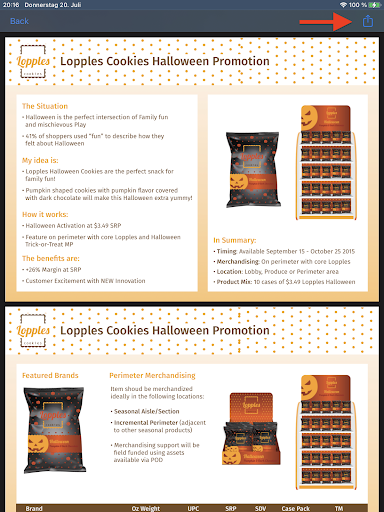
1. From the Attachments tab, open and preview the relevant attachment.
2. Click **Sharing**.
    
    ![Share Attachments in Offline Mobile App](https://sf-zdocs-cdn-prod.zoominsoftware.com/tdta-ind-consumer_goods_retail_user-264-0-0-production-enus/c29c1565-468d-4bd8-b719-36effa83e44b/consumer_goods_retail_user/images/cg_retail_offlineapp_share_attachments.png)