
Customize the UI, lookup, datasource, and process contracts in Visual Studio (VS) Code based Modeler. Build the contracts and review the customization in the simulator app.
Required Editions
| Available in: Lightning Experience in Enterprise and Unlimited Editions that have Consumer Goods Cloud enabled |
-
To load the sales organization, in VS Code based Modeler, open the
Application_CockpitProcess.processflow.xml contract and add this code.
<Action name="CardUserWelcome_loadData" actionType="LOAD" type="LuCallCountByDate"> <Parameters> <Input name="cardDate" value="ProcessContext::CardDate" /> </Parameters> <Return name="ProcessContext::LuCallCount"/> <TransitionTo action="LoadSalesOrg" /> </Action> <Action name="LoadSalesOrg" actionType="LOAD" type="LuSalesOrg"> <Return name="ProcessContext::SalesOrg" /> <TransitionTo action="LoadTodoCount" /> </Action> <Action name="LoadTodoCount" actionType="LOAD" type="LuTodoCountByDate"/> - Save your changes.
-
To bind the
companyLogoandcompanyLogoFileTypetargets, add this code to theUserWelcomesection in the Application_CockpitUI.userinterface.xml contract.<UserWelcome name="UserWelcomeCardUiPlugin"> <Bindings> <Binding target="userImage" type="Blob" binding="ApplicationContext::User.profilePicture" /> <Binding target="companyLogo" type="Blob" binding="ProcessContext::SalesOrg.mediaPath" /> <Binding target="companyLogoFileType" type="Text" binding="ProcessContext::SalesOrg.fileType" /> <Binding target="userName" type="Text" binding="ApplicationContext::User name" bindingMode="ONE_WAY" /> - Save your changes.
-
To define the simple properties for
mediaPathandfileType, add this code to the LuSalesOrg.lookupobject.xml contract.<SimpleProperty name="legalInformation" type="DomLongDescription" dataSourceProperty="legalInformation" <SimpleProperty name="currency" type="DomCurrency" dataSourceProperty="currency" /> <SimpleProperty name="mediaPath" type="DomBlob" dataSourceProperty="mediaPath" /> <SimpleProperty name="fileType" type="DomFileType" dataSourceProperty="fileType" /> </SimpleProperties> - Save your changes.
-
To link the
Sales_Organization,SF_FileLink, andSF_Fileentities to each other through joins and conditions, add this code to the DsLuSalesOrg_sf.datasource.xml contract.<Attribute name="accountNumber" table="Sales_Organization__c" column="Account_Number__c" /> <Attribute name="legalInformation" table="Sales_Organization__c" column="Legal_Information__c" /> <Attribute name="currency" table="Sales_Organization__c" column="Currency__c" /> <DerivedAttribute name="mediaPath" value="CASE SF_File.Usage__c WHEN 'Icon' THEN SF_File.VersionData ELSE ' ' END" /> <DerivedAttribute name="fileType" value="replace(SF_File.PathOnClient, rtrim(SF_File.PathOnClient, replace(SF_File.PathOnClient, '•', ")), ")"/> </Attributes> <Entities> <Entity name="Sales_Organization alias="" idAttribute="Id" /> <Entity name="SF_FileLink" alias=""> <Join Type="left outer"> <SimpleJoin> <Condition leftSideValue="SF_FileLink.ParentId"comparator="eq" rightSideType="Attribute" rightSideValue="Sales_Organization__c.Id" /> </SimpleJoin> </Join> </Entity> <Entity name="SF_File" alias='> <Join Type="left outer"> <SimpleJoin> <Condition leftSideValue="SF_FileLink.FileId" comparator="eq" rightSideType="Attribute" rightSideValue="SF_File.Id" /> </SimpleJoin> </ Join> </Entity> </Entities> - Save your changes.
-
To retrieve the IDs of files from either sales folder or sales organization and to
label sales organization file IDs as parent ID, add these snippets in the
DsBoSfReplicationCallbacks_sf.datasource.xml contract.
Add this SQL query statement at the highlighted position in the
AllMandatoryAttachmentsForSyncsection.sqlStmt += "UNION "; sqlStmt += "SELECT SF_File.Id FROM SF_File "; sqlStmt += "INNER JOIN SF_FileLink ON SF_FileLink.FileId = SF_File.Id "; sqlStmt += "INNER JOIN Sales_Organization__c ON SF_FileLink.ParentId = Sales_Organization__c.Id ";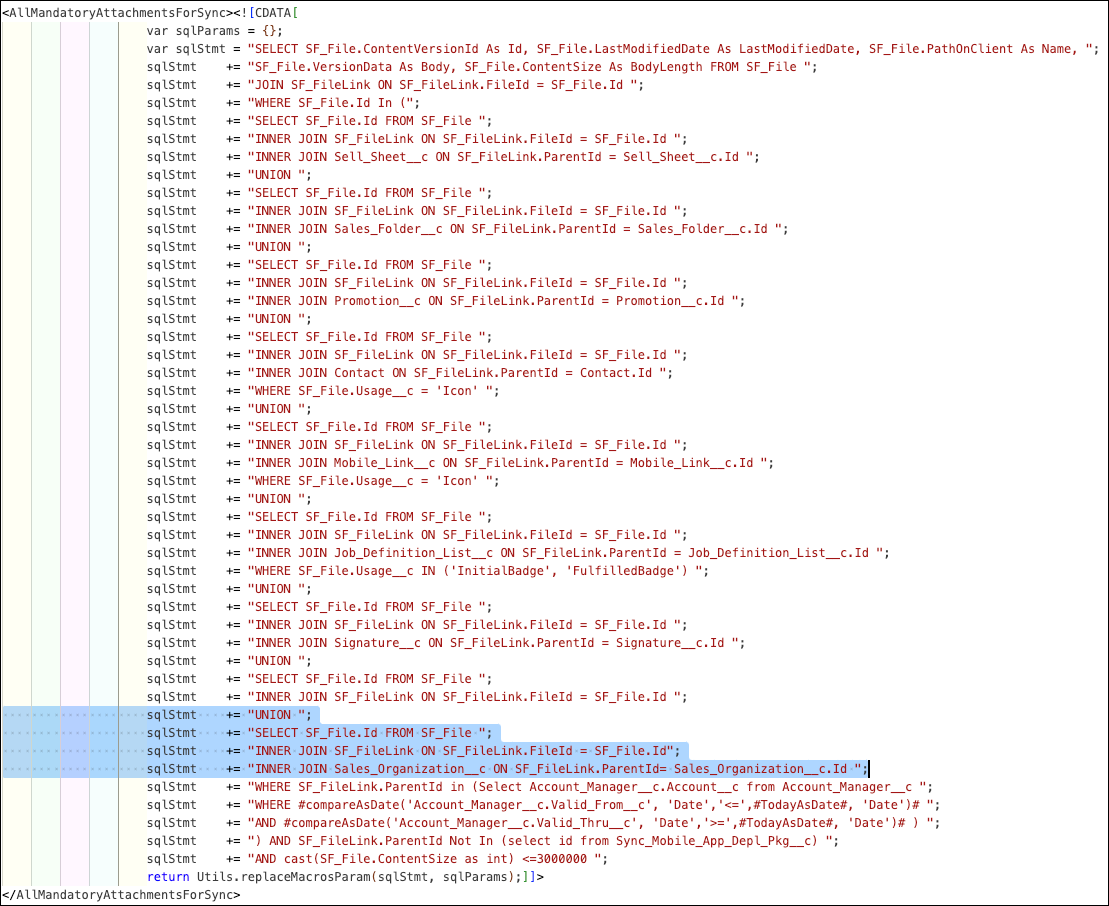
Add this snippet before the
Visitsection in theAllAttachmentssection.//###################################################### //## Sales Org ## //###################################################### sqlStmt += "SELECT Id as parentId FROM Sales_Organization__c "; sqlStmt += "UNION "; //##################################################### //############ //## Visit ## //############ - Save your changes.
-
To check for validation errors, build the modified contracts by running this command in
VS Code based Modeler:
sf modeler workspace
          build