
Set up and capture signatures during business processes such as orders, contracts, or daily reports, by Using Signature Capture objects.
Required Editions
| Available in: Lightning Experience in Enterprise and Unlimited Editions that have Consumer Goods Cloud enabled |
The image shows the objects that manage signatures.
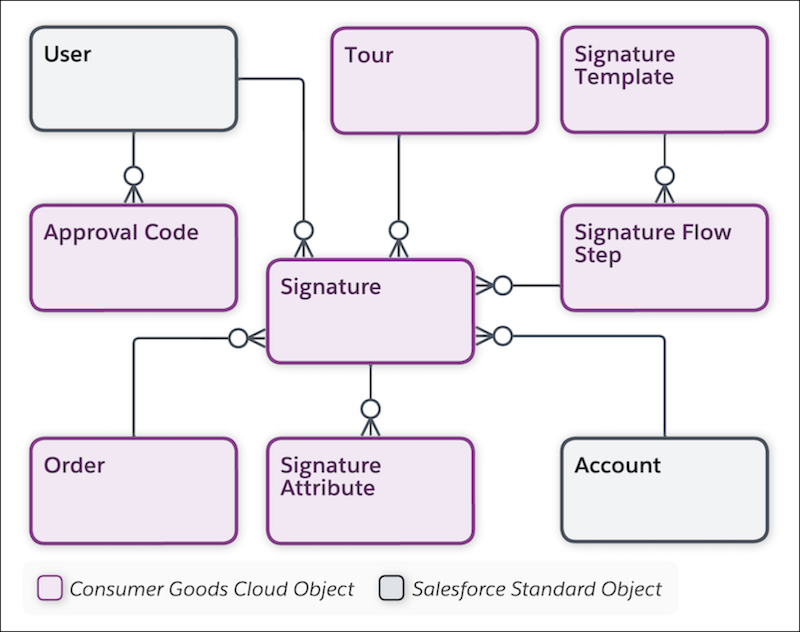
| Object | API Name | Description |
|---|---|---|
| Account | Account | Information on customers with whom you conduct business. An account can be a retailer, distributor, wholesaler, or consumer. |
| Advanced Order | cgcloud__Order__c | Header details of an order that contains references to a visit, customer, order, and delivery date. |
| Approval Code | cgcloud__Approval_Code__c | Use approval codes for DSD for warehouse checkers or cashiers to authenticate critical business transactions from the user such as inventory check-out or cash-check-in. |
| Signature | cgcloud__Signature__c | Signature of a user and its attributes such as the name of the signatory, order, tour, and user. Use this object to associate a signature with a signature template and signature flow step. |
| Signature Attribute | cgcloud__Signature_Attribute__c | Attribute and attribute value for a signature. For example, Name, Customer Id, and Amount are the attributes that appear with a signature during order-taking and order review. |
| Signature Flow Step | cgcloud__Signature_Flow_Step__c | Sequence of required signatures associated with a signature template. |
| Signature Template | cgcloud__Signature_Template__c | Template to create and define the general characteristics of a signature such as description, location, attribute set (shown while capturing or reviewing a signature in an order or invoice), and sales org. |
| Tour | cgcloud__Tour__c | Tour details such as the date of the tour, tour notes, vehicle, and route details. You can create a tour from a route (van-sales tour) or independently. |
| User | User | Specific business roles for a sales org. Users conduct retail activities based on the defined role (for example: sales rep or supervisor). |