
Manage assets by using Asset and Point of Sale (POS) objects and relationships.
Required Editions
| Available in: Lightning Experience in Enterprise and Unlimited Editions that have Consumer Goods Cloud enabled |
The image shows the objects to manage assets and POS.
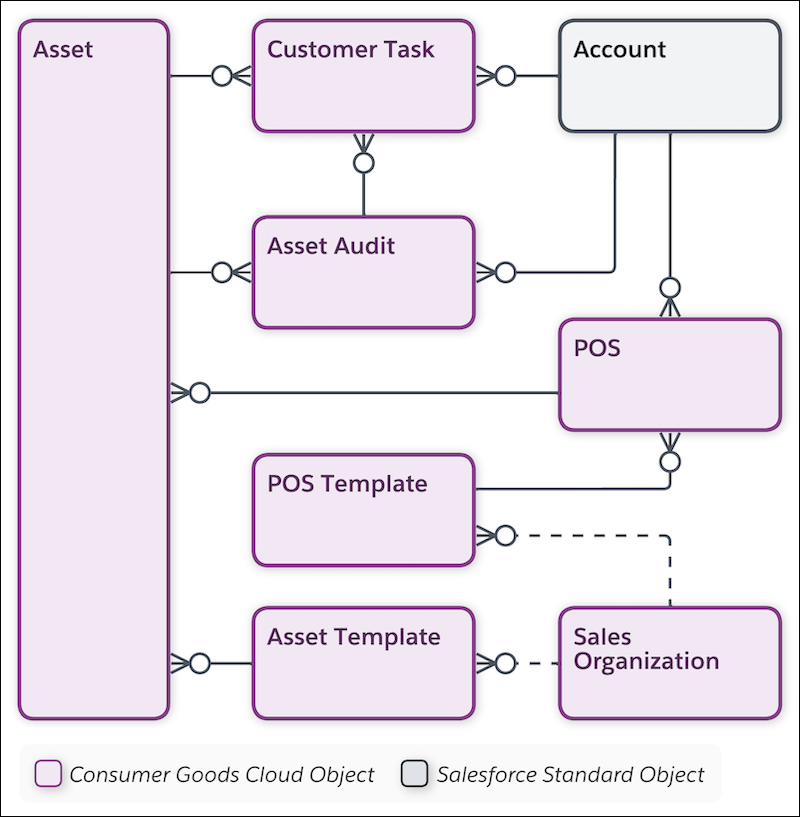
| Object | API Name | Description |
|---|---|---|
| Account | Account | Information on customers with whom you conduct business. An account can be a retailer, distributor, wholesaler, or consumer. |
| Asset | Asset | Manufacturers can place items of value, such as a fridge or coolant at customers' locations to stock perishable items or products based on specific conditions. You can regularly track assets to evaluate their condition. |
| Asset Audit | cgcloud__Asset_Audit__c | Information about the condition of an asset at the customer location. Sales reps can verify the asset’s condition during store visits and raise a customer task for repair or replacement. |
| Asset Template | cgcloud__Asset_Template__c | Characteristics that you require to create an asset of a specific type. For example, single doors, multiple doors, or mini-fridges are templates to create an asset-type refrigerator. |
| Customer Task | cgcloud__Account_Task__c | Customer-specific tasks such as repair, replacement, or service for an asset that you create during asset audit. |
| POS | cgcloud__POS__c | Location (other than primary shelf) within the retail store where users place products for promotion or to increase sales. For example: shelf, sales counter, freezer, or vending machine. |
| POS Template | cgcloud__POS_Template__c | A template that creates and defines the type of Point of Sale. For example: premium beverages or snack shelves. |
| Sales Organization | cgcloud__Sales_Organization__c | Business segments that you use to structure your data and business processes by your organizational unit. You can base business segmentation on geographical territories, product division, or account team. |