
User Cockpit, also known as Your Day, helps you stay organized while you perform your basic field activities. Access information about your visits and automatically sync your mobile device with the data from Salesforce and vice versa. Perform inventory tasks and create orders.
Required Editions
| Available in: Lightning Experience in Professional, Unlimited, and Enterprise Editions that have Consumer Goods Cloud enabled |
This image shows how the User Cockpit for the Base Data Model is organized with cards.
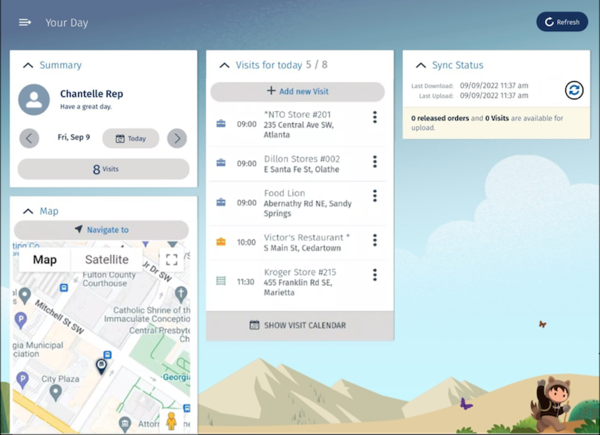
This table lists the cards of a User Cockpit for a base data model.
| Card | Description |
|---|---|
| Summary | View your name, picture, and the number of open visits for a selected date. |
| Visits for Today | View the list of planned and in-progress visits scheduled for the day selected on the
Summary card. To see scheduled visits for the week, tap Show Visit
Calendar. Tap  and see the daily view, all visits, and only the open visits. and see the daily view, all visits, and only the open visits. |
| Sync Status | View the last download and upload timestamp of data sync between Salesforce and your
mobile device. This card also shows the number of released orders and visits where data is
available for upload. To sync the latest data, tap  . To see user
notifications, click Refresh after the sync. . To see user
notifications, click Refresh after the sync. |
| Map | See the map of your visit location. Tap and see the daily
view, all visits, and only the open visits. |
For more options such as view the order history, execute, cancel, delete, and copy the orders,
customize app settings, and get information about the app, tap  . This table lists the
additional options.
. This table lists the
additional options.
| Option | Description |
|---|---|
| Order |
Understand the customer’s order behavior by viewing the customer's orders, both open and released. Execute, cancel, delete, and copy your open orders. Create orders during store visits based on various order types, such as:
|
| My Settings | Choose your landing page, and review your calendar and theme settings. See Personalize Your Settings. |
| About | Read and copy the support and license information, and the app license agreement terms. |
| Logout | Log out of the app. |