
Retail Store Cockpits for Base Data Model show planned visits and tasks, in the form of cards.
Required Editions
| Available in: Lightning Experience in Professional, Enterprise, and Unlimited Editions that have Consumer Goods Cloud enabled. |
This image shows the Retail Store Cockpit for a base data model.
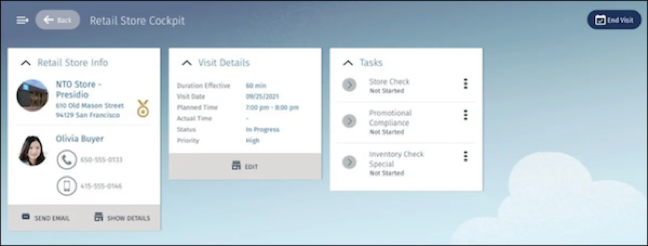
This table describes the cards of the Retail Store Cockpit for a base data model.
| Card | Description |
|---|---|
| Retail Store Info |
View the store name, address, store image, and badges that determine the customer priority. Also, view the image and phone numbers of the store manager.
|
| Visit Details | View the visit duration, planned visit time, actual start time, priority, and status of the visit. To edit the visit information, tap Edit. |
| Tasks | View the open tasks associated with the visit. The app supports inventory check and other custom tasks. |