
Daily reports track productive and unproductive time for each sales rep. Sales reps can create a daily report at the end of each day based on template configurations.
Required Editions
| Available in: Lightning Experience in Professional, Enterprise, and Unlimited Editions that have Consumer Goods Cloud enabled. |
The typical workflow of a daily report is explained in this image.
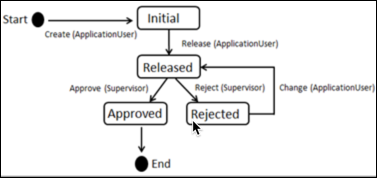
The workflow includes these steps:
- A daily report is created. The status of the report is Initial.
- Reps enter the time that's spent for each activity, and then release the report. The responsible user of the report changes, and the report is sent to the supervisor for approval.
- A supervisor can either accept or reject the report. If a supervisor rejects a daily report, then the user can modify the report, and send it back for approval.
To enable this workflow, create a daily report template and define its activities.
- Create a Daily Report Template for Sales Reps
Use daily report templates to create daily reports. A daily report template specifies basic characteristics of reports such as the workflow used and the platform on which a report can be created. - Create Daily Report Template Activities for Sales Reps
Add activities for which the time must be tracked to a daily report template. When a report is created by using the template, all the activities in the template are added in the report. Sales reps can then add the time that was spent on each of those activities.