
Configurations needed for the creation of cash float transactions for standard orders, van sales, or delivery documents. Cash flow transactions are tracked only for payments made in cash or check for the order or direct store, or van sales deliveries.
Required Editions
| Available in: Lightning Experience |
| Available in: Enterprise and Unlimited Editions where Consumer Goods Cloud is enabled |
Here’s an illustration of various templates that need to be configured for cash float creation.
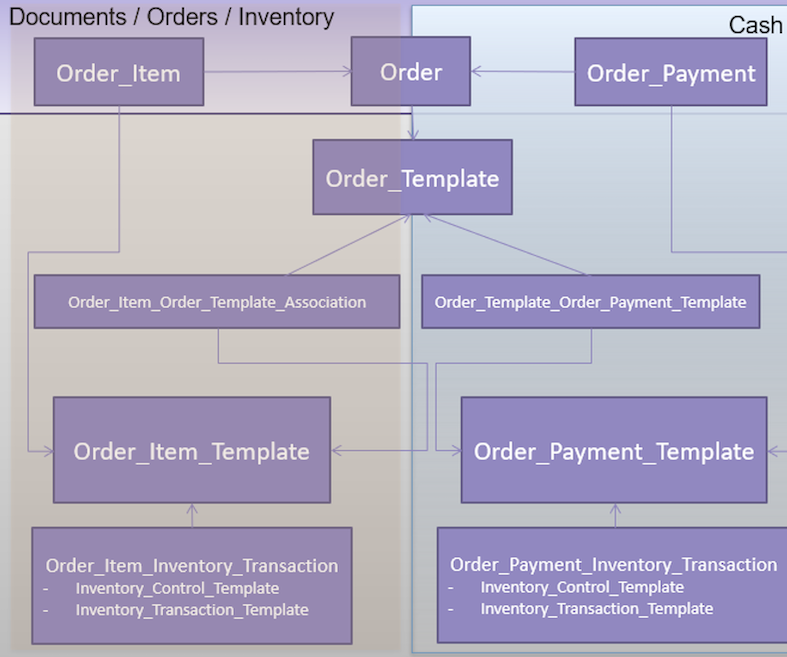
Configurations needed for creating cash float transactions:
- In Order Template
- Inventory Reference 1 as needed (for example, as Tour). You can even set the inventory reference as Vehicle or Actual User. You can use Inventory Reference 2, Inventory Reference 3, or Inventory Reference 4 fields in place of Inventory Reference 1. Depending on the reference field that is used here, the corresponding reference field on Inventory Transaction Template needs to be checked.
- Order Template Order Payment Template record associated to Order Payment Template.
- In Order Payment Template, Order Payment Inventory Transaction with
- Active as Yes
- Inventory Control Template as Tour Inventory (Tour) in line with the inventory reference. If the inventory reference is Vehicle, choose the Inventory Control Template as Tour Inventory (Vehicle). For the user, choose Tour Inventory (User).
- Payment Method as needed.
- Inventory Transaction Template as needed.
- In Inventory, a new inventory with the Record Type as Cash Float.
- In Inventory Control Template
- Record Type as Cash Float
- Tour or Vehicle or User Policy as One depending on the inventory reference present in the order template. A cash float inventory and cash float inventory transaction is created if this anchor combination doesn’t exist. If the anchor combination exists for an inventory, then no new inventory is created and the inventory transactions are added to the existing inventory.
- Inventory Control Measure as Value/Domestic Currency.
- In Inventory Transaction Template
- Transaction Control as needed
- Transaction Type as needed
- Inventory Reference in correlation with the Inventory Reference in the Order Template