When you add a lookup table to an expression set version that is associated with a context definition, you can map the table’s input variables to list variables from the definition. With this mapping, you can look up multiple values in the list variable at the same time and get their corresponding output values.
Required Editions
| Available in: Lightning Experience |
| Available in: Enterprise, Unlimited, and Developer Editions for clouds that have Business Rules Engine enabled |


- Creates an expression set that’s associated with a context definition that has tags. The tags store various details related to apparel.
- Creates a decision matrix named Apparel_Price to look up the price of an apparel item based on the item’s size, brand, and fabric.
- Adds a lookup table step to the expression set version and selects the decision matrix.
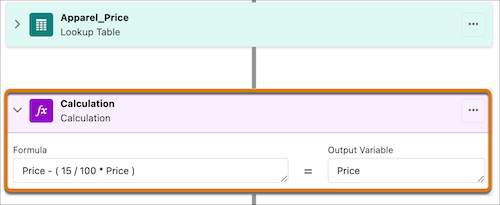
- Adds a calculation step to perform further calculation on the prices retrieved from the lookup table step.
The matrix column names are imported into the version as the version’s local resources.
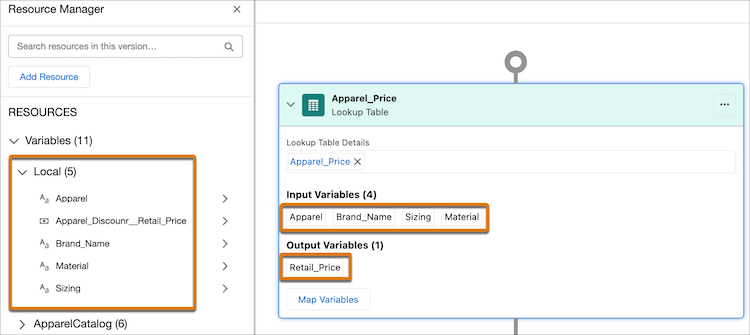
To get the prices of multiple apparel items from the lookup table simultaneously, Donisha maps the table’s variables to list variables from the ApparelCatalog context definition that’s associated with the expression set. She knows that the mapping is successful when the local variables that are imported from the lookup table are removed from the resources list.
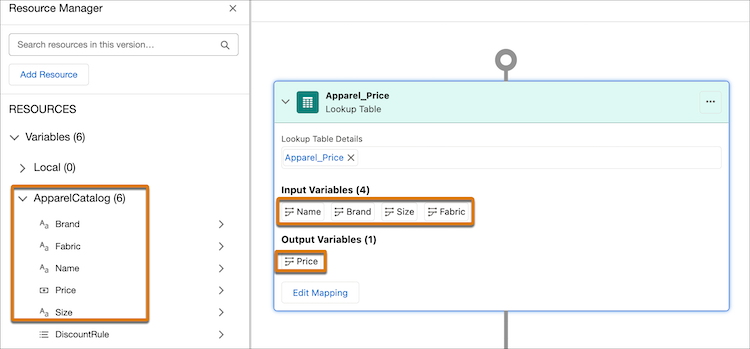
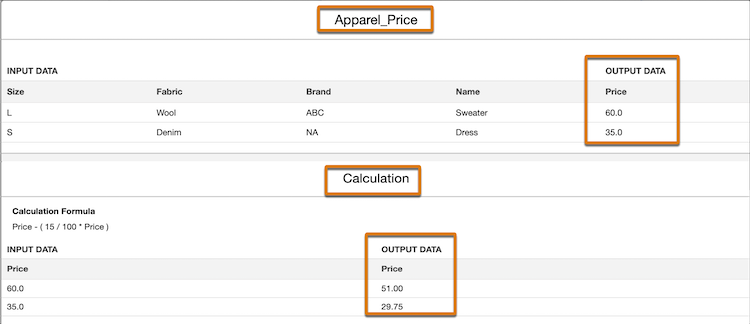
The calculation step takes the corresponding prices for the inputs from the lookup table and calculates the revised prices at a discount of 15%. The revised price is written back to the context definition associated with the Price tag.
To test whether the steps worked as expected, Donisha simulates the expression set version.
Here’s how Donisha simultaneously passes two sets of input values for the mapped list variables to the expression set version.
{
  "ApparelCatalog": [
    {
      "Size": "L",
      "Fabric": "Wool",
      "Brand": "ABC",
      "Name": "Sweater"
    },
    {
      "Size": "S",
      "Fabric": "Denim",
      "Brand": "NA",
      "Name": "Dress"
    }
  ]
}
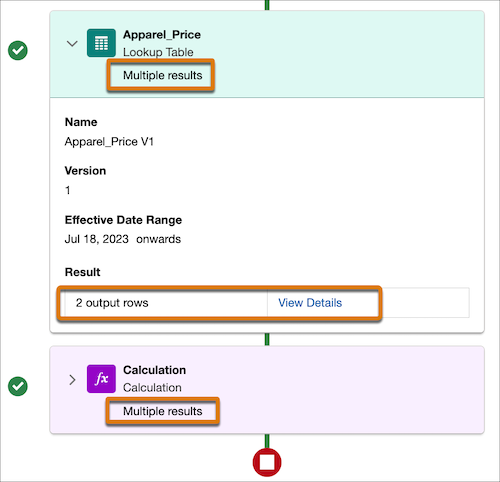
When the version is simulated, it generates the results for the two sets of inputs for both the lookup table step and the calculation step.