
Configure how taxes are calculated on the billing amounts of your taxable products or services, or import tax amounts calculated by an external system.
This flowchart shows how users with the Billing Admin and Tax Admin permission sets can configure tax calculation for invoices in Revenue Management.
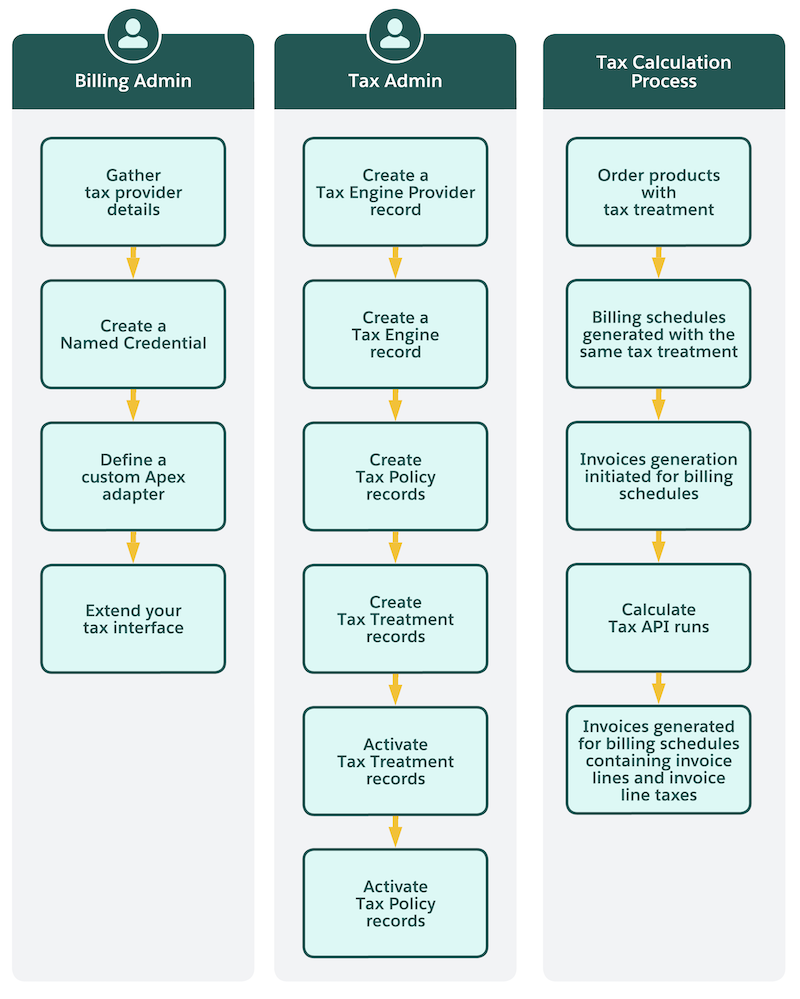
- Set Up
Create tax policies and treatments before you configure a tax engine. You can also capture taxes at the invoice header. - Tax Calculation Solutions
When you set up tax calculation, match each product’s tax needs to a partner or custom tax engine, the Revenue Standard Tax Engine, or imported tax lines. You can use more than one tax engine when products have different tax needs. - Partner or Custom Tax Engine
When you need complex tax jurisdictions or already use a tax vendor, you connect a partner tax app or your own tax engine. The TaxEngineAdapter Apex interface retrieves information from the tax engine and evaluates the information to define tax details. - Revenue Standard Tax Engine
Organizations often face challenges when managing taxes. Common issues include dependency on external tax vendors for simple scenarios, extra licensing and per-transaction costs, performance overhead from external API calls, and regulatory or data residency constraints. These challenges make tax management more complex and costly than necessary. The revenue standard tax engine addresses these issues by enabling internal tax calculation and storage for predictable tax structures. By handling simple tax scenarios internally, organizations can streamline their Revenue Management processes. - Import External Tax Lines into Billing
Bring in the tax amounts calculated by an external system for draft invoices. - Additional Tax Information
After you choose a tax engine, Billing uses tax policies and treatments to decide how invoices are taxed. You can also capture a consolidated tax amount at the invoice header. Billing then calculates tax and stores tax totals on the invoice.