Explore an example that shows how the Standard Tax Engine applies multiple tax rates to an invoice based on location, currency, and product criteria.
Required Editions
| Available in: Lightning Experience |
| Available in: Enterprise, Unlimited, and Developer Editions with the Revenue Cloud Advanced license or the Revenue Cloud Billing license |
Cloud Kicks sells products across the United States and operates using USD as its currency. The company has configured these tax rates in Standard Tax for the Acme_US legal entity.

Consider an invoice generated on 11/25/2025, with a single invoice line having a Professional Services product for a customer based out of San Francisco, California.
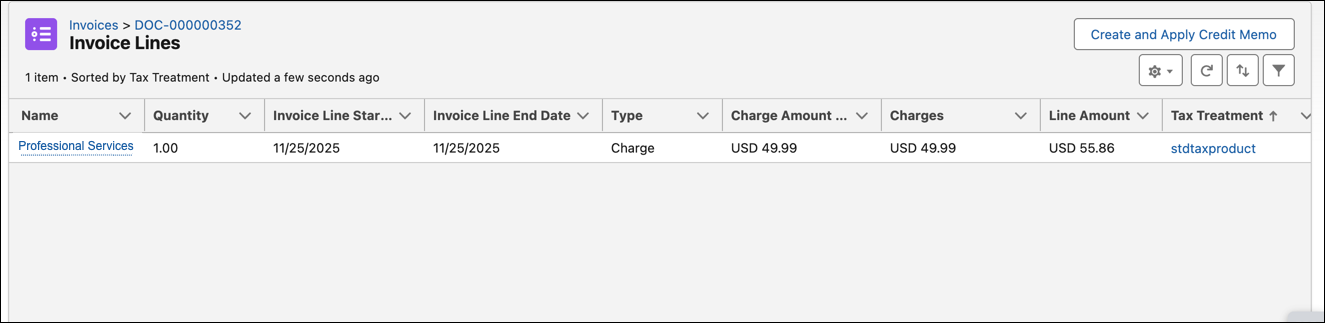
When Acme Corp invoices a customer in San Francisco, California, using the Standard Tax Engine, Revenue Management matches the invoice line to the applicable tax rates by using the in-built decision table.
The matching logic considers the invoice line’s Legal Entity, Country ISO code, and State ISO code, Currency ISO Code, Product Code to filter the tax rate records which are applicable.
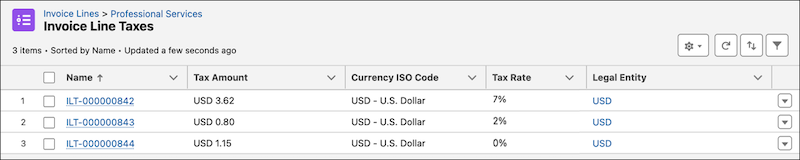
In our example the first four rows match and the resulting invoice line taxes generated.