
Set up Payments to streamline the management of the entire payment lifecycle. By establishing a secure connection with native and third-party payment providers, you can directly process payments for customer transactions within your Salesforce environment.
Required Editions
| Available in: Lightning Experience |
| Available in: Enterprise, Unlimited, and Developer Editions with Revenue Cloud |
| To integrate a native payment gateway, you have two options. Use Salesforce Payments, which runs on Stripe and is available with the the Revenue Cloud Billing license on a cost-per-transaction basis. Or, connect your own Adyen account, contracted directly with Adyen. |
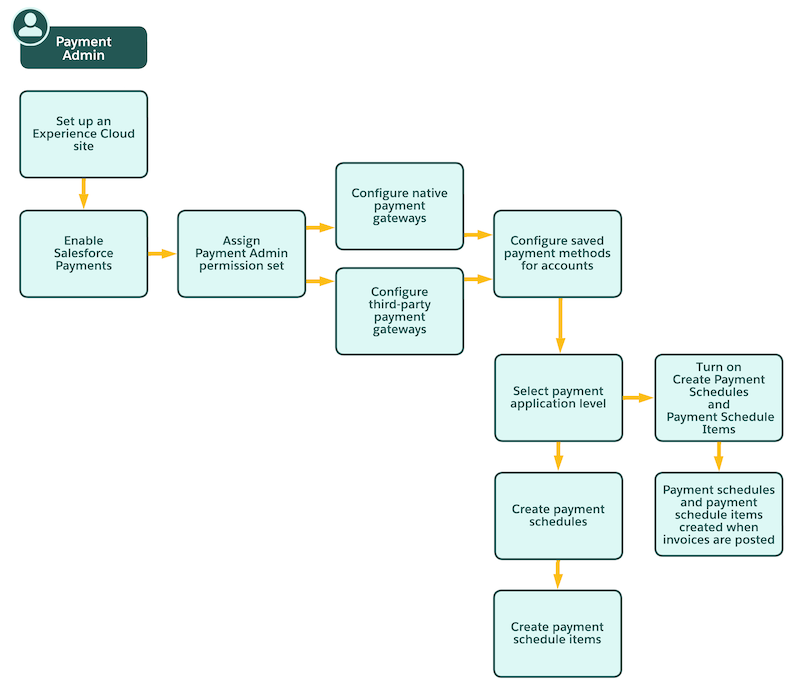
This flowchart shows how a user with the Payment Admin permission set can set up Payments in Revenue Management.
- Configure Salesforce Payments
To use Salesforce Payments for financial transactions, set up an Experience Cloud site and enable Payments for your org. Then, use a guided setup to create a merchant account and payment methods. - Set Up Native Payment Gateways by Using Salesforce Payments
Accept electronic payments from your customers on Stripe and Adyen payment gateways by using the Salesforce Payments native payment service. Create new Stripe merchant accounts or connect your existing Adyen merchant accounts by using Salesforce Payments. - Set Up Third-Party Payment Gateways
Bring your own third-party payment gateways to process payments and issue refunds. Set up and add external payment gateways, and then connect them to Billing. - Configure Payment Features in Billing
Set up Billing to automatically create payment schedules and payment schedule items for posted invoices, share payment accounts, retry failed payments, pass payment metadata via payment gateways, issue refunds, apply credits and payments to settle the balances of invoices or invoice lines, and automate dunning orchestration. - Configure Saved Payment Methods for Revenue Management
Collect one-time or scheduled recurring payments by securely saving the payment methods of your customers, rather than manually entering payment method details each time a payment is processed. Save various payment methods from native or third-party payment gateways, and set a default saved payment method for each account. - Migrate Tokenized Saved Payment Methods
Expand your payment ecosystem by bringing in externally tokenized payment methods into your Salesforce org. Bring in external payment method tokens generated by using buyer-facing portals or the Self-Service Billing portal, and save them as payment methods in your Salesforce org. These externally saved payment methods are immediately available for use in payments batch processing. - Generate Pay Now Links for Business Accounts
Collect invoice payments against the correct business account by generating Pay Now links. Your customers pay as a guest with their preferred payment method and can save it for future use.