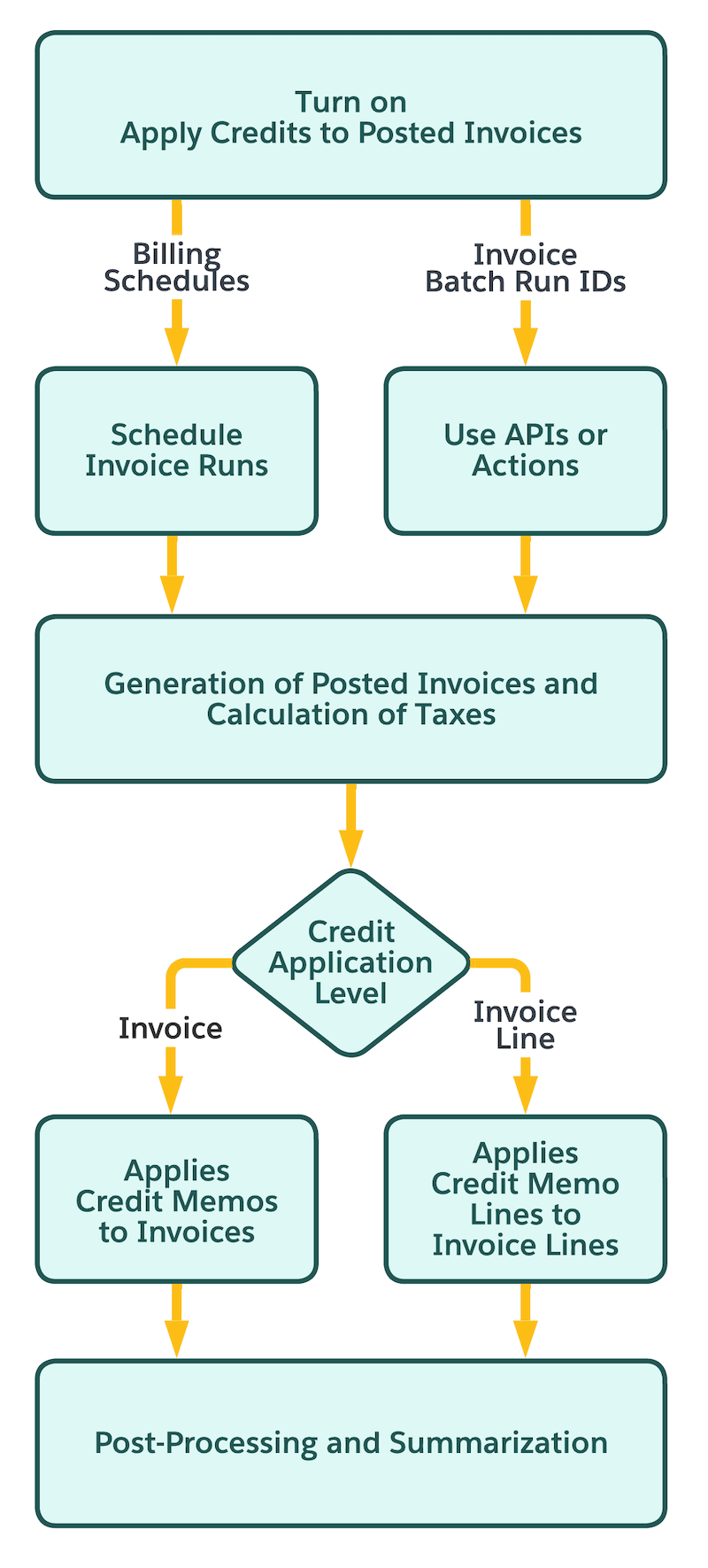
Eliminate the need to manually apply credit memos by automatically applying available credit memo balances to settle the balances of posted invoices. Required Editions Available in: Lightning Experience Available in: Enterprise, Unlimited, and Developer Editions with the Revenue Cloud Advanced license or the Revenue Cloud Billing license Process Overview When your Billing admin enables the Apply Credits to Posted Invoices feature, the system automatically applies the balances of credit memo to settle the balances of posted invoices based on the credit application level. The automatic credit application process runs immediately after invoices are posted by using one of these methods: After a scheduled invoice run completes. Using Post Draft Invoices in Batch API. After running the Post Draft Invoice Batch Run action. Visualizing the Process This flowchart shows the step where credit application happens in the business process flow.
Eliminate the need to manually apply credit memos by automatically applying available credit memo balances to settle the balances of posted invoices. Required Editions Available in: Lightning Experience Available in: Enterprise, Unlimited, and Developer Editions with the Revenue Cloud Advanced license or the Revenue Cloud Billing license Process Overview When your Billing admin enables the Apply Credits to Posted Invoices feature, the system automatically applies the balances of credit memo to settle the balances of posted invoices based on the credit application level. The automatic credit application process runs immediately after invoices are posted by using one of these methods: After a scheduled invoice run completes. Using Post Draft Invoices in Batch API. After running the Post Draft Invoice Batch Run action. Visualizing the Process This flowchart shows the step where credit application happens in the business process flow.