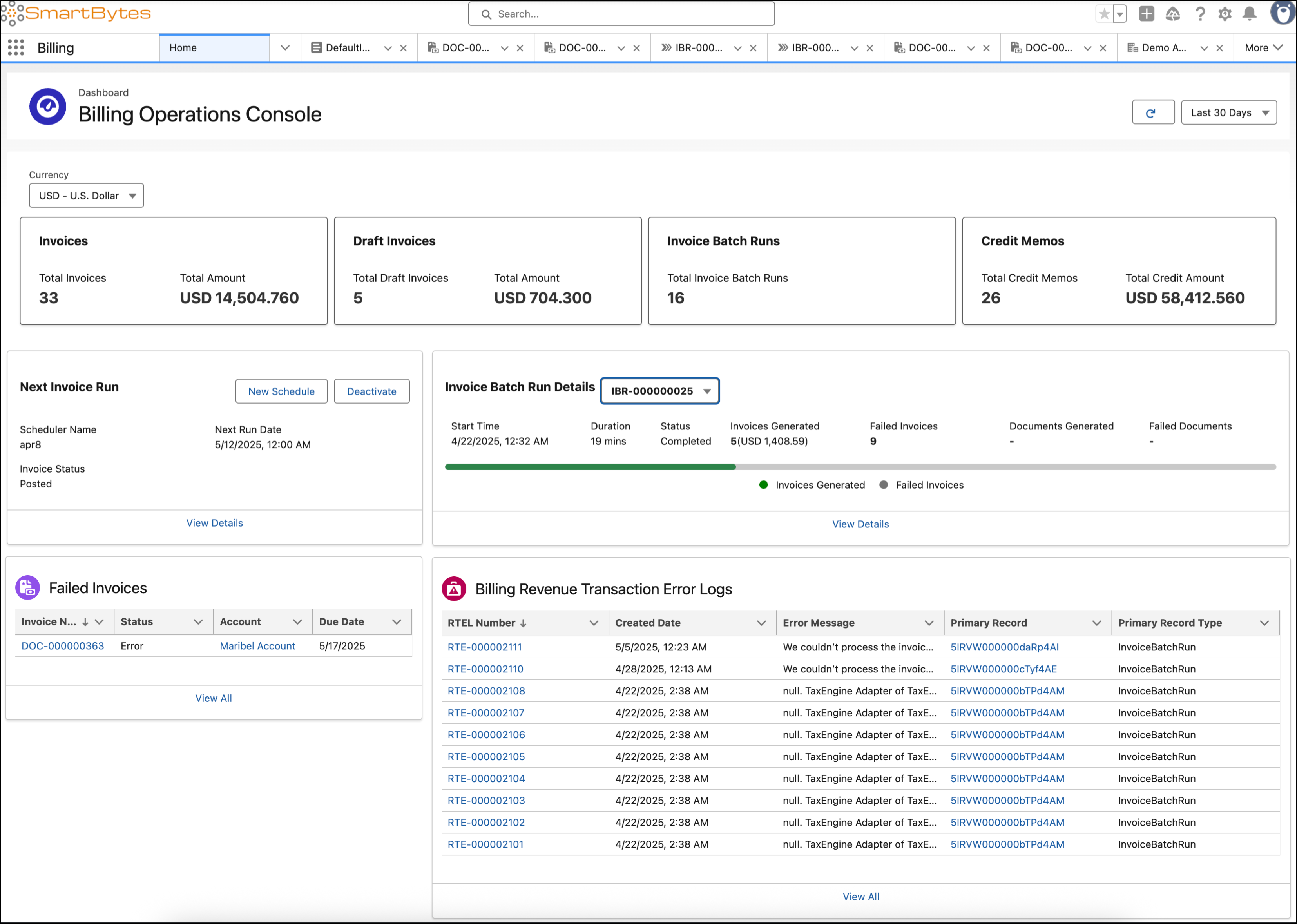
Monitor invoices, credit memos, and invoice schedules with ease. Manage billing transactions effectively with timely insights into revenue transaction log errors and failed invoices.
Required Editions
| Available in: Lightning Experience |
| Available in: Enterprise, Unlimited, and Developer Editions with the Revenue Cloud Advanced license or the Revenue Cloud Billing license |
From the App Launcher, find and select Billing. From the navigation bar, click Home.
Key Metrics
View key financial data in summary cards to quickly assess billing activities.
- Invoices: Track billing transactions with the total count and amount of invoices.
- Draft Invoices: Review the total count and amount of draft invoices before finalizing the invoices.
- Invoice Batch Runs: Monitor processing volume with the total number of completed batch runs.
- Credit Memos: Track issued credits with the total count and amount of credit memos.
Invoice Management
Manage invoice schedules and batch runs within the console.
- Next Invoice Run: View the upcoming invoice runs. Schedule new invoices or deactivate invoices in this section.
- Invoice Batch Run Details: Review invoice batch run details for past runs. Retry document generation or recover failed batches from this section.
Issue Resolution
Resolve invoice issues efficiently.
- Failed Invoices: Review invoices with processing errors, their status, account, and due date. Identify the issues and resolve them.
- Billing Revenue Transaction Error Logs: Review revenue transaction error logs related to billing transactions with details such as the error message, creation date, and related records. Analyze the information to troubleshoot and fix billing errors.
Billing Metrics
View a summary of open billing activities.
- Number of Open Billing Cases: The total count of active billing-related cases.
- Open Disputes: The number of currently active disputes.
- Disputed Invoices: A count of the distinct invoices that have been disputed.
- Total Disputed Amount: The cumulative amount that’s currently in dispute.
- Navigation Link: A configurable link that directs users to a case landing page or a specific report.
Filters
Use filters to customize the data shown on the dashboard.
- Date range: View data from the last 7, 14, or 30 days.
- Currency: View invoices, credit memos, and draft invoices in a specific currency.