
Create and apply credit memos to decrease the balance of invoices when the quantity or price of orders are amended.
Required Editions
| Available in: Lightning Experience |
| Available in: Enterprise, Unlimited, and Developer Editions with the Revenue Cloud Advanced license or the Revenue Cloud Billing license |
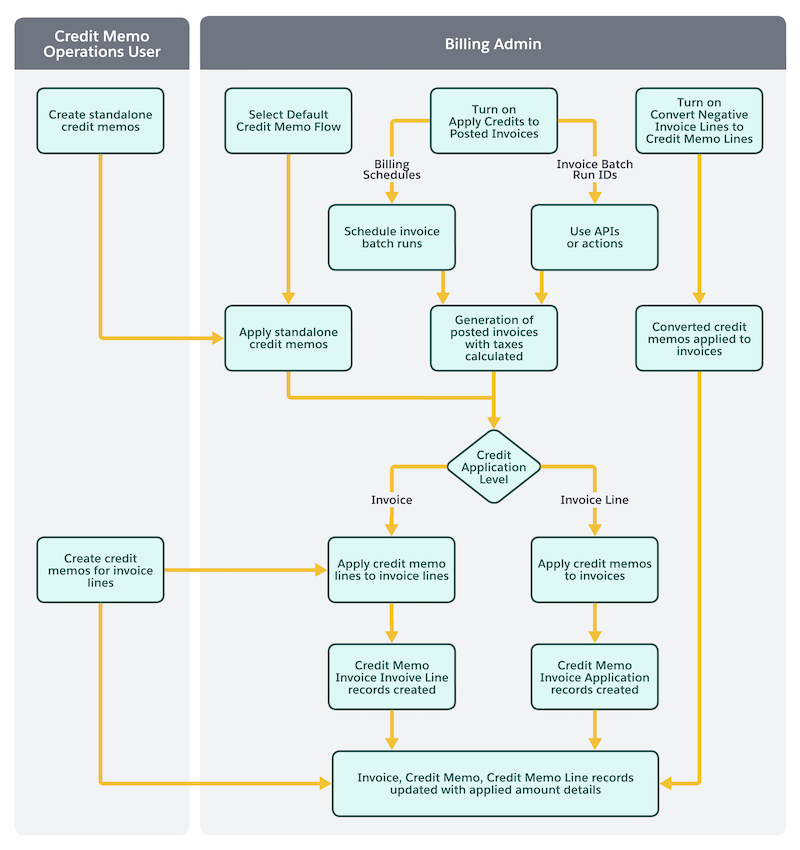
This flowchart shows how a user with the Credit Memo Operations User permission set can use credit memos in Revenue Management.
- About Credit Memos
A credit memo is a document issued by a seller to a buyer to acknowledge a reduction in the amount owed by the customer. - Credit Memo Data Model in Revenue Management
The Credit Memo data model depicts the objects and their relationships to adjust invoices through credit amounts for returns, overcharges, or other billing discrepancies. - Set Up Credit Memo Features
Set up Billing to automatically create credit memos from negative invoice lines and apply them to settle outstanding invoice balances, and to configure whether credits apply to invoices or invoice lines. - Create and Apply Standalone Credit Memos
Create individual credit memos to efficiently provide credits to your customers. Apply these credits to the relevant customer invoice. - Create and Apply Credit Memos to Invoice Lines
Generate credit memos for an account and apply them to invoice and invoice lines that belong to the same account. - Void or Recover Credit Memos
Fix credit memos that are Pending or Error status by recovering them. You can also void an unapplied posted credit memo and reverse the credit by creating a corresponding debit memo. - Automatic Conversion of Negative Invoice Lines into Credit Memo Lines
In certain billing scenarios, an invoice line can be generated with a negative charge amount. This typically occurs when you amend an order to decrease the quantity of a product and generate an invoice for the amended product, or generate an invoice for an order product that has a negative price. Automate conversion of large volumes of such negative invoice lines to credit memo lines, and the application of these credit memo lines to invoices. - Automatic Application of Credits to Settle Invoice Balances
Eliminate the need to manually apply credit memos by automatically applying available credit memo balances to settle the balances of posted invoices. - Manage Credit Memos by Using APIs or Flow Actions
Use APIs or Flow actions to create credit memos, apply credit memos to invoices, unapply already applied credits from invoices, and convert negative invoice lines into posted credit memos. - Results of Credit Memo Application
After posted invoices are generated, credits are applied based on the credit application level.