
Review the high-level procedure to set up and manage visits in Automotive Cloud.
Required Editions
| Available in: Enterprise, Unlimited, and Developer Editions |
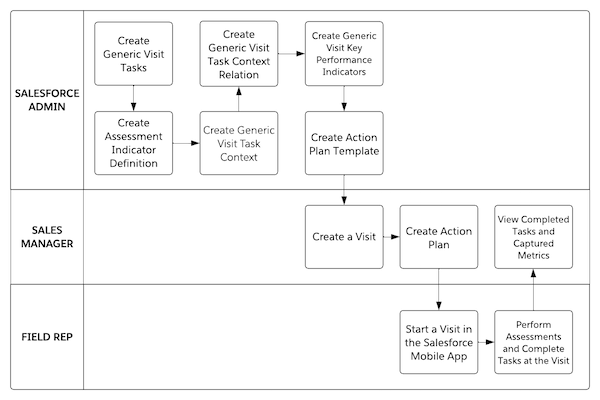
Salesforce Admin Workflow
- Create tasks that field reps must perform at a visit. See Create Tasks for Dealer Visits.
- Specify the parameters to capture the performance or compliance metrics. See Assess Dealer Visits with Metrics.
- Associate other Salesforce records with tasks to make the visits more meaningful. See Add Context for Tasks Performed During Dealer Visits.
- Compare expected and actual values for the metrics captured for a particular task. See Create Dealer Visit Key Performance Indicators.
- Create an action plan template to capture the frequently performed tasks. See Create an Action Plan Template for Dealer Visits.
Sales Manager Workflow
- Create a visit and assign a field rep. See Create a Dealer Visit.
- Relate an action plan to a visit. See Determine the Tasks to Perform During a Dealer Visit.
- After a field rep completes their visit, view completed tasks and track the captured metrics.
Field Rep Workflow
Start a visit by using the Partner Visits app on your mobile device. Check visit details, perform tasks, capture metrics, and take notes. See Visit Dealers and Perform Tasks On the Go.