---
schema_version: "1"
id: c3c24a0900403ee6440ce0a1568a2fe06fc6dd8c46359b3196e54249b32132db
title: Set Up Units of Measure for Automotive Cloud
collection: admin
version: current
locale: en-us
portal_url: https://docs.salesforce.com/admin/current/en-us/ind/264-0-0/auto_units_of_measure.md
canonical_url: https://help.salesforce.com/s/articleView?id=ind.auto_units_of_measure.htm&release=264.0.0&type=5
source_site: help.salesforce.com
content_type: documentation
content_hash: 14c91cf3547a0ac541a858a05324b886414be05246c23c5beae80b90f38082d0
description: Configure units of measure to specify the predefined unit for quantity, distance, or weight specifications.
products:
- Automotive
release: "264"
---
# Set Up Units of Measure for Automotive Cloud
Configure units of measure to specify the predefined unit for quantity, distance, or weight specifications.
### Required Editions
Available in: Enterprise, Unlimited, and Developer Editions.
User Permissions Needed
To create units of measure:
Customize Application
In Automotive Cloud, help users define the odometer reading for vehicles with distance-based units of measure. You can also set up quantity-based units of measure that help users define product quantity.
1. From Setup, go to Object Manager.
2. Search for and select **Unit of Measure**.
3. Click **Fields and Relationships**.
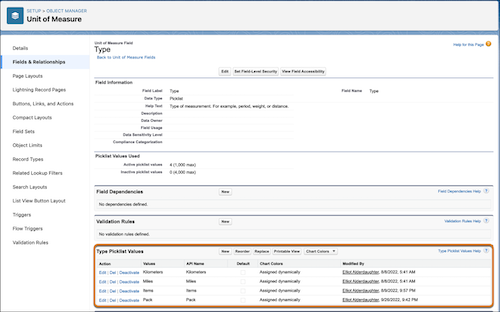
4. Click **Type** and click **New** in the Type Picklist Values section.
5. Add picklist values in the text box and click **Save**.
Examples include Kilometers, and Miles for Odometer Reading Unit of Measure. Or, Pack, and Each for Product Quantity Unit of Measure.
6. From the App Launcher, find and select **Units of Measure**.
7. Click **New**.
8. Enter a name.
9. Enter a unit code to uniquely identify the measure.
10. Select the **Type**.
11. Save your changes.