
You can create relationship cards that display the stakeholder information related to a vehicle on the Vehicle record page.
Required Editions
| Available in: Enterprise, Unlimited, and Developer Editions. |
The card draws information from the Account and Asset Account Participant records related to a vehicle. While the Account object is related to the Vehicle object, the Asset Account Participant object is related to the Account object. Here are the fields on the Account and Asset Account Participant records that users want to refer to on the cards.
| Field | Object Where Info Is Stored |
|---|---|
| Account Phone | Account |
| Account Type | Account |
| Name | Asset Account Participant |
| Stakeholder Role | Asset Account Participant |
Select source objects and fields for the card.
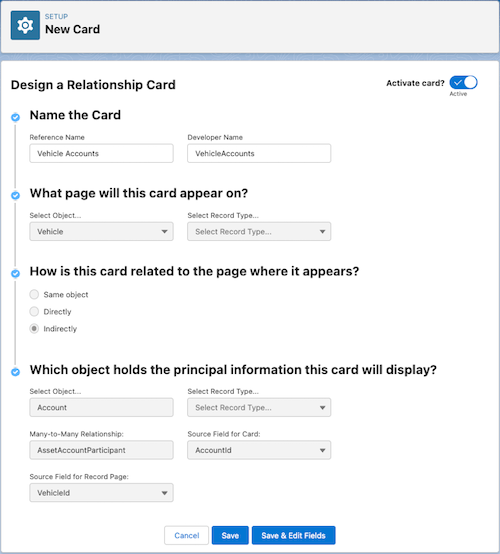
- In Setup, select Relationship Card Type Manager, and click New.
- Specify these details.
- Reference Name: Vehicle Accounts
- Developer Name: VehicleAccounts
- Select Object: Vehicle
- How is this card related to the page where it appears: Indirectly
- Select Object: Account
- Many-to-Many Relationship: AssetAccountParticipant
- Source Field for Card: AccountId
- Source Field for Record Page: VehicleId
- Click Save & Edit Fields.
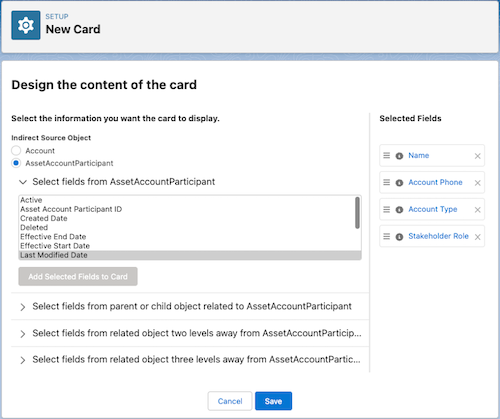
Select fields to display on the card.
- Add the fields from the Account object.
- For the Indirect Source Object, select Account.
- Select the Account Phone and Account Type fields, and add the selected fields to the card.
- Add the fields from the Asset Account Participant object.
- For the Indirect Source Object, select AssetAccountParticipant.
- Select the Name and Stakeholder Role fields, and add the selected fields to the card.
- Change the order of the Name field by dragging it above the Account Phone field in the Selected Fields panel.
- Save your changes.
After creating the card, you can activate the card and add it to the record page layout of the Vehicle object.