Customer service representatives (CSRs) can orchestrate every step of the service journey
for dealers and end-customers with a unified console. CSRs can use Service Console for
Automotive to get a 360-degree view of their customers without opening multiple applications
and to multitask without losing the context of the interaction. They can also track previous
conversations on a timeline, inspect related Vehicle, Order, and Case records, and initiate
actions, such as booking a test drive or scheduling a dealer visit.
Required Editions
| Available in: Enterprise, Unlimited, and
Developer Editions.
|
Service Console for Automotive brings together powerful Service Excellence components on
a single console page. These components can be extended and customized to meet the
business needs of an original equipment manufacturer, both within the console and with
standard apps.
To view a caller’s information in the console, a CSR can open their Contact record. When
a customer calls, an Engagement Interaction record is created in the background. The CSR
can verify the customer’s details with the Identity Verification flow that automatically
redirects them to the console page.
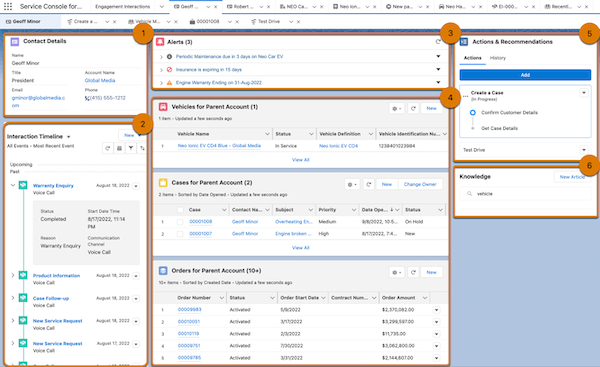
Here’s what CSRs can do within the console.
View Contact Details
CSRs can view the contact details of the customer or dealer [1]. This helps CSRs
maintain the flow of the interaction without missing a beat.
Track Engagements on a Timeline
CSRs can track previous interactions with dealers or customers on a chronological,
visual timeline to ensure continuity and gauge a caller’s sentiment and queries
across conversations [2]. While Service Console for Automotive comes with a
preconfigured timeline that shows previous engagement interactions, you can
customize the timeline to show other records like cases and orders.
See Alerts For Records That Require Action
With timely, contextual alerts, CSRs can keep a note of the items that need attention
and make proactive recommendations to customers or dealers [3]. Get
business-specific alerts on records that need attention like vehicle insurance
expiration, upcoming engine maintenance, or warranty upselling opportunities.
Manage Vehicle, Case, and Order Records
Get snapshots of the Vehicle, Case, and Order records related to a dealer or customer
[4]. CSRs can view the details of related vehicles, cases, and orders by opening the
records in the console as subtabs. They can also edit records and create records
from the related list in the console.
Take Relevant Actions
CSRs can quickly resolve customer requests by checking for recommended actions and
launching the relevant actions [5]. CSRs can launch the actions that are configured
for their use case, for example, creating work orders, selling warranties, or
scheduling product training for dealer sales representatives. If a customer calls,
you can initiate actions such as booking a service appointment, scheduling a test
drive, and providing roadside assistance. CSRs can also look at the history of the
previously executed actions.
Refer to Knowledge Articles
CSRs can answer the questions of dealers and end- customers by searching for and
opening the relevant Knowledge articles [6].

