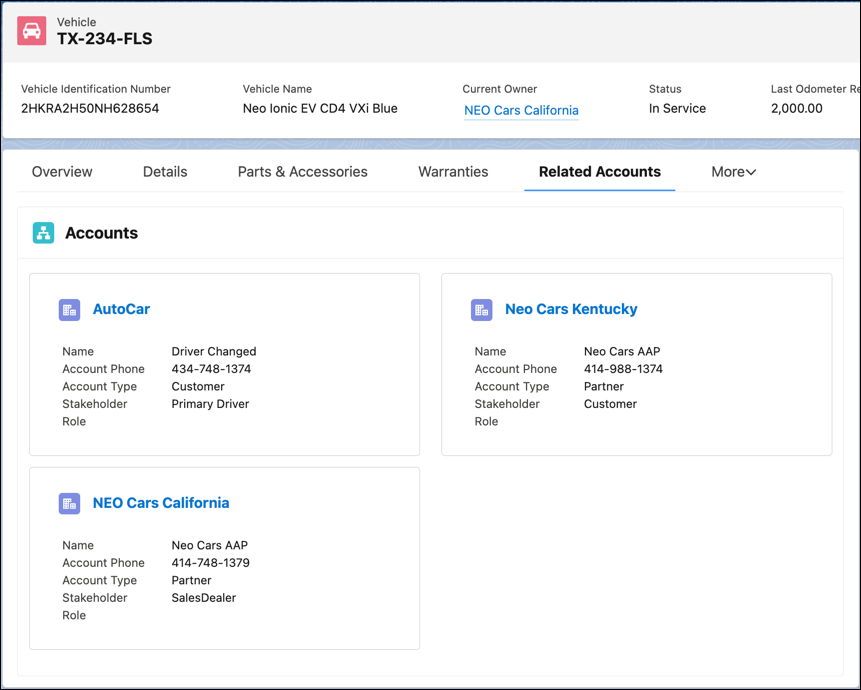
Use relationship cards to view all stakeholders associated with a vehicle record. Based
on how your admin has configured the relationship cards and the Vehicle page layout, you can see
cards for each asset account participant and asset contact participant associated with a Vehicle
record.
Required Editions
| Available in: Enterprise, Unlimited, and Developer
Editions. |
Make sure your admin has added the Relationship Cards component to the Vehicle record page
layout that’s assigned to your user profile.
Relationship cards can connect and display several types of information. For example, you can
view each Account that’s associated with the Asset record for a vehicle. The accounts can be
sales dealers, service dealers, owners, or customers.
You can also have relationship cards that show the various Contact records associated with
the Asset record for a vehicle. The contacts can be sales relationship managers, borrowers, or
drivers.
Review the key information for each stakeholder on the card, and click the card to open the
Account or Contact record.