---
schema_version: "1"
id: 7647c0e6b31f8dcda9f9d06a1889aab3e4bae6457b4f95a7c62bfbaa8064f861
title: Take a Tour of the Funding Workbench Console
collection: admin
version: current
locale: en-us
portal_url: https://docs.salesforce.com/admin/current/en-us/ind/264-0-0/auto_funding_workbench_console_features.md
canonical_url: https://help.salesforce.com/s/articleView?id=ind.auto_funding_workbench_console_features.htm&release=264.0.0&type=5
source_site: help.salesforce.com
content_type: documentation
content_hash: e254fd66ae8e7e70587ed9cfe9a6eb8b7b8d3a91cec45f9adf2372584c776dc4
description: After a loan or lease proposal has been reviewed, rehashed, and accepted by the customers and approved by the dealers, the funding process begins. This final phase involves the lender disbursing funds to the dealer, so the customer can take the vehicle home. The Funding Workbench console helps with this flow, from the dealer uploading documents to the creation of action items for the funding analyst and the analyst's verification of those items and related documents.
products:
  - Automotive
release: "264"
---
# Take a Tour of the Funding Workbench Console

After a loan or lease proposal has been reviewed, rehashed, and accepted by the customers and approved by the dealers, the funding process begins. This final phase involves the lender disbursing funds to the dealer, so the customer can take the vehicle home. The Funding Workbench console helps with this flow, from the dealer uploading documents to the creation of action items for the funding analyst and the analyst's verification of those items and related documents.

### Required Editions

<table class="slds-table slds-table_bordered slds-max-medium-table_stacked slds-m-bottom_small edition"><colgroup><col></colgroup><tbody><tr class=""><td class="slds-cell-wrap" style="vertical-align:top;">Available in: Lightning Experience</td></tr><tr class=""><td class="slds-cell-wrap" style="vertical-align:top;">Available in: <strong>Enterprise</strong>, <strong>Unlimited</strong>, and <strong>Developer</strong> Editions.</td></tr></tbody></table>

## Key Personas Involved

- **Dealer/Finance Rep**: Collaborates directly with the customer to finalize contract terms. They gather signed documents from the customer and upload them for the funding analyst's review.
- **Funding Analyst**: Acts as a checkpoint to disperse funds to the dealer. They ensure the contract complies with lending guidelines, is in the correct format, and includes all required documents. The funding workbench is where the funding analyst reviews and approves the funding or rejects it with actionable feedback.

## Workflow

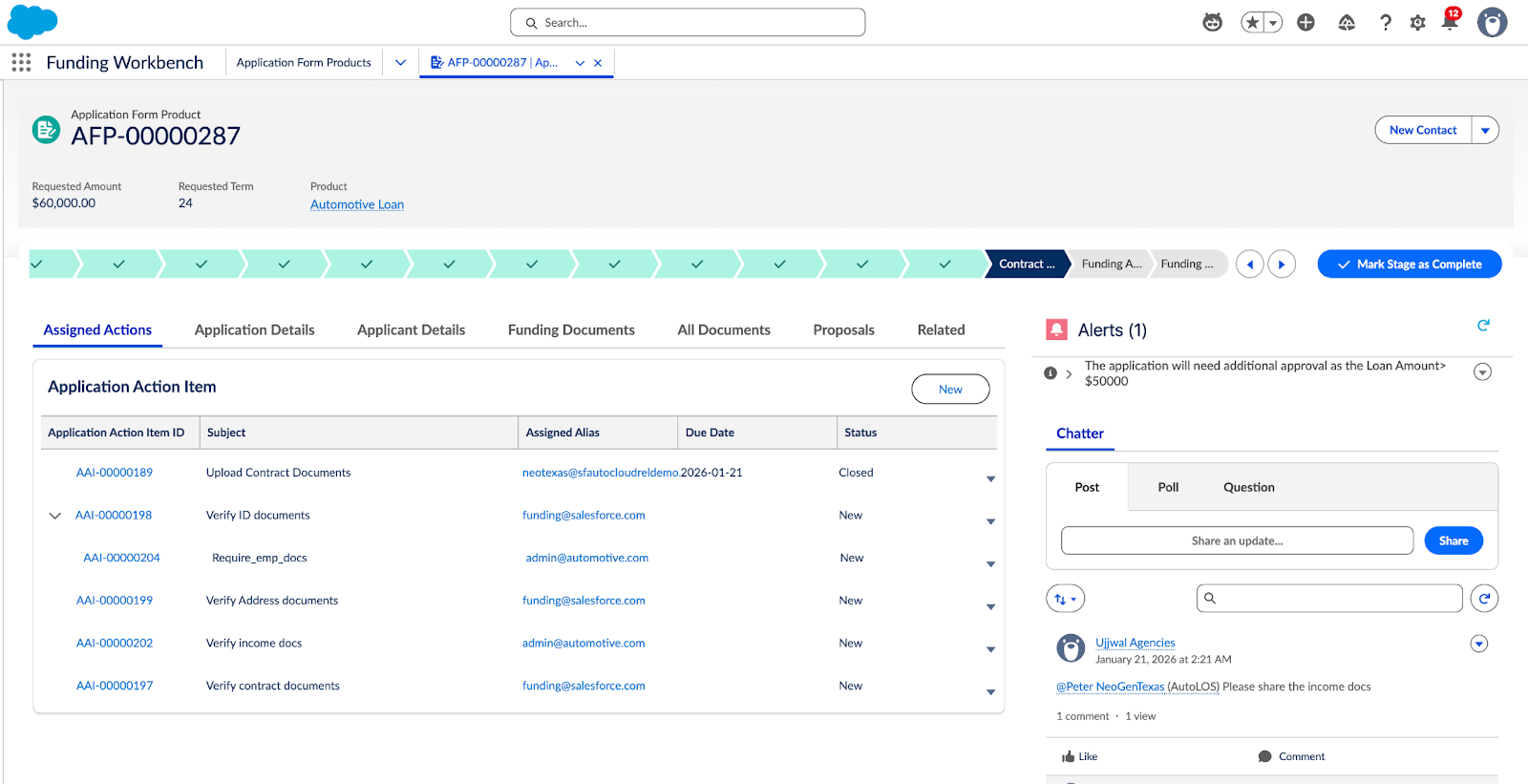
The Funding Workbench provides a simplified process for the upload and verification of documents required for making final funding decisions for a loan or lease proposal on a single console page.

<table class="slds-table slds-table_bordered slds-max-medium-table_stacked slds-m-bottom_small ">
        <colgroup>
          <col style="width:50%">
          <col style="width:50%">
        </colgroup>
        <thead class="slds-text-title_caps ">
          <tr class="">
            <th scope="col" class="slds-cell-wrap" style="vertical-align:top;" id="d32751e94">Scenario</th>
            <th scope="col" class="slds-cell-wrap" style="vertical-align:top;" id="d32751e97">As shown on Org</th>
          </tr>
        </thead>
        <tbody>
          <tr class="">
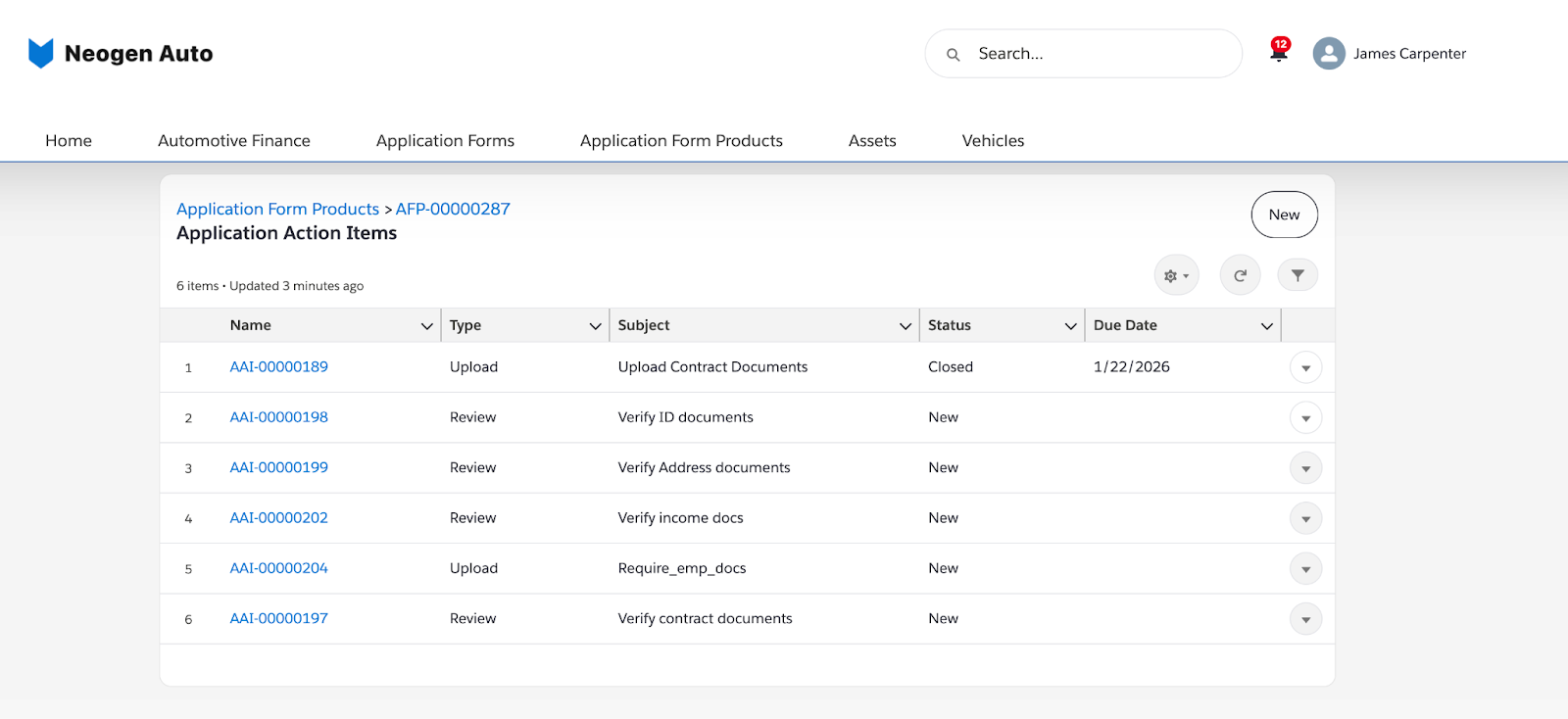
            <td data-label="Scenario" class="slds-cell-wrap" style="vertical-align:top;" headers="d32751e94 ">Once a loan has been approved and accepted, the Funding Analyst initiates an
              action item for the dealer for an application form product.</td>

            <td data-label="As shown on Org" class="slds-cell-wrap" style="vertical-align:top;" headers="d32751e97 "><span style="vertical-align:text-bottom;display:inline-block;"><img style="margin-bottom:0;" src="https://sf-zdocs-cdn-prod.zoominsoftware.com/tdta-ind-automotive-264-0-0-production-enus/55098325-b838-4fed-9e79-8cfa2d7b33a3/automotive/images/auto_funding_workbench_aai.png" alt="AAI"></span></td>

          </tr>
          <tr class="">
            <td data-label="Scenario" class="slds-cell-wrap" style="vertical-align:top;" headers="d32751e94 ">
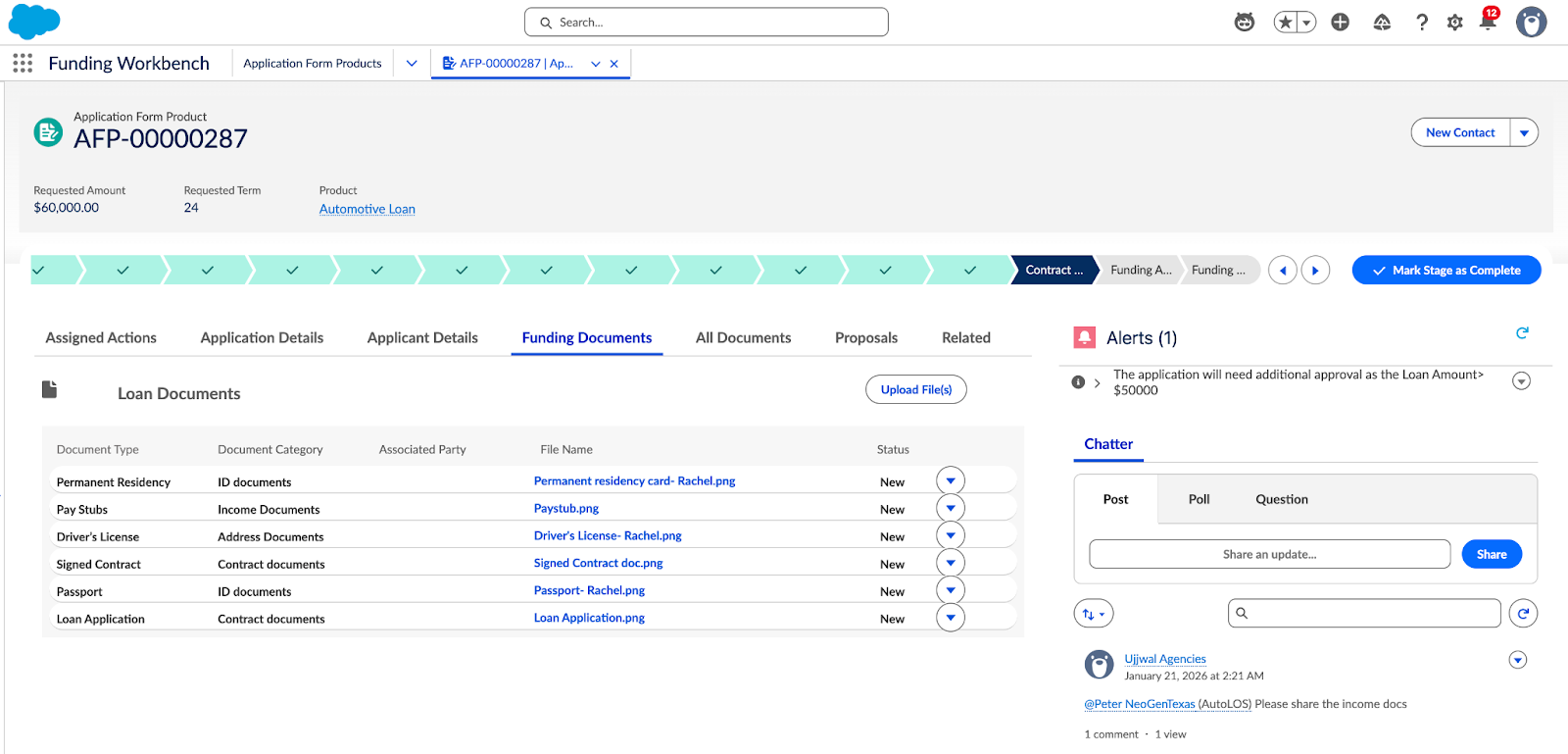
              <p>The dealer then uploads the necessary documentation, such as, the driver’s
                license, signed contract, application form, and insurance documents on the dealer
                portal.</p>
              <p style="margin-bottom:0;">Upon uploading the required files, the dealer marks the action item as
                complete.</p>
            </td>

            <td data-label="As shown on Org" class="slds-cell-wrap" style="vertical-align:top;" headers="d32751e97 "><span style="vertical-align:text-bottom;display:inline-block;"><img style="margin-bottom:0;" src="https://sf-zdocs-cdn-prod.zoominsoftware.com/tdta-ind-automotive-264-0-0-production-enus/55098325-b838-4fed-9e79-8cfa2d7b33a3/automotive/images/auto_funding_workbench_dealer_aai.png" alt="AAI on Dealer portal"></span></td>

          </tr>
          <tr class="">
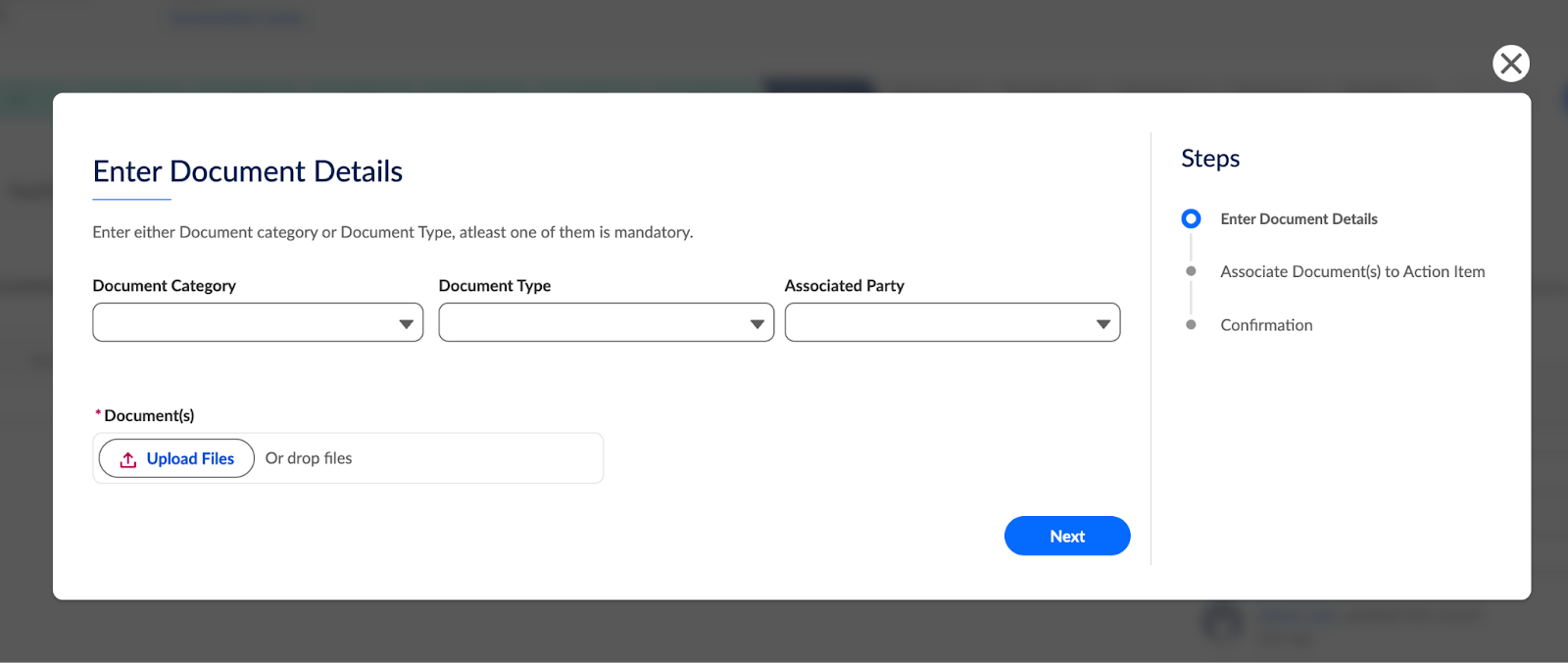
            <td data-label="Scenario" class="slds-cell-wrap" style="vertical-align:top;" headers="d32751e94 ">A Funding Analyst can then review the uploaded documents for accuracy and
              compliance as well as view the tasks created for them to work on.</td>

            <td data-label="As shown on Org" class="slds-cell-wrap" style="vertical-align:top;" headers="d32751e97 "><span style="vertical-align:text-bottom;display:inline-block;"><img style="margin-bottom:0;" src="https://sf-zdocs-cdn-prod.zoominsoftware.com/tdta-ind-automotive-264-0-0-production-enus/55098325-b838-4fed-9e79-8cfa2d7b33a3/automotive/images/auto_funding_workbench_loan_docs.png" alt="Loan documents"></span></td>

          </tr>
          <tr class="">
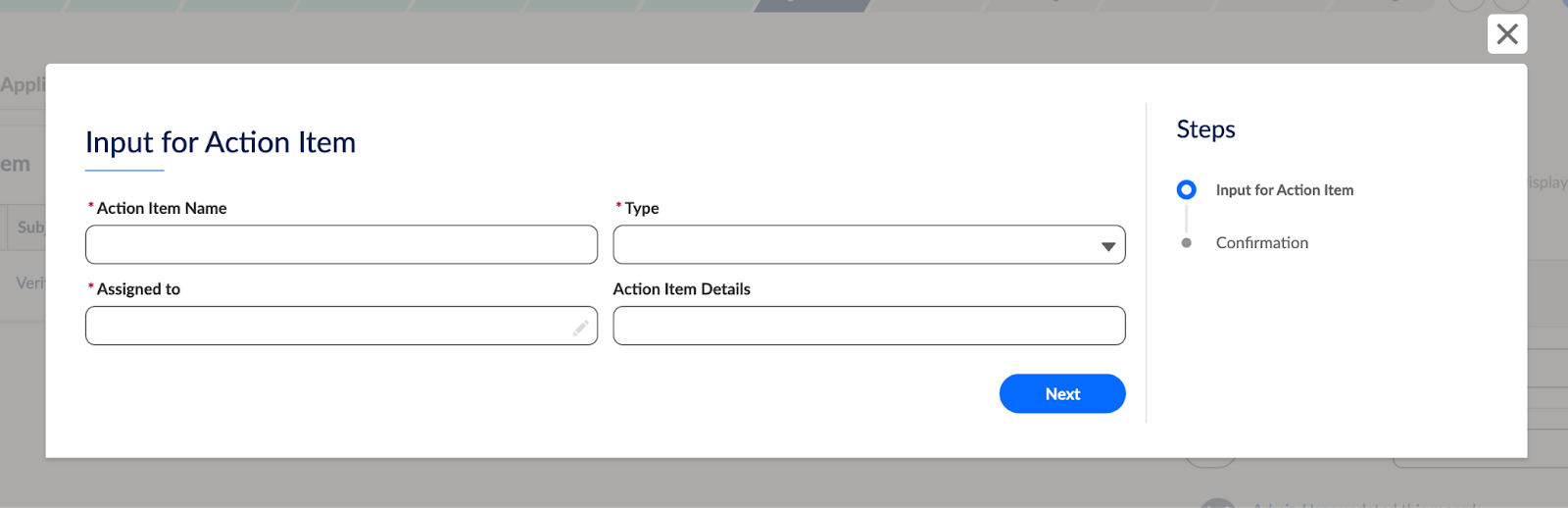
            <td data-label="Scenario" class="slds-cell-wrap" style="vertical-align:top;" headers="d32751e94 ">If documents are missing or incorrect, the analyst can upload more documents
              and create tasks corresponding to a document type or category, create another action
              item for the dealer, or create subtasks. The dealer can then rectify the issue and
              restart the verification loop.</td>

            <td data-label="As shown on Org" class="slds-cell-wrap" style="vertical-align:top;" headers="d32751e97 ">
              <p><span style="vertical-align:text-bottom;display:inline-block;"><img style="margin-bottom:0;" src="https://sf-zdocs-cdn-prod.zoominsoftware.com/tdta-ind-automotive-264-0-0-production-enus/55098325-b838-4fed-9e79-8cfa2d7b33a3/automotive/images/auto_funding_workbench_upload_doc_details.png" alt="Document upload"></span></p>
              <p style="margin-bottom:0;"><span style="vertical-align:text-bottom;display:inline-block;"><img style="margin-bottom:0;" src="https://sf-zdocs-cdn-prod.zoominsoftware.com/tdta-ind-automotive-264-0-0-production-enus/55098325-b838-4fed-9e79-8cfa2d7b33a3/automotive/images/auto_funding_workbench_input_for_ai.png" alt="Action Item selection"></span></p>
            </td>

          </tr>
        </tbody>
      </table>

Following a successful review, the analyst updates the application status to either Funding Approved or Rejected. Use the Timeline component on the Application Form Product page to view all the tasks and interaction summaries. Users can also utilise the Chatter component on the Application Form Product page to communicate with each other regarding the funding decisions.