Make dealer visits more meaningful by relating other Salesforce records with the tasks
that evaluation officers perform during a visit. Sales managers can use Generic Visit Task Context
records to relate a task with a specific context, such as the dealer’s Account record, a Sales
Agreement record, or even an Asset Warranty record. For example, you can create a task for
checking the promotion banners at a dealer showroom and relate the relevant Promotion record as
the task context.
Required Editions
| Available in: Enterprise, Unlimited, and Developer
Editions |
| User Permissions Needed |
| To create generic visit task contexts: |
- Partner Visit Management permission set
- Create access on Generic Visit Task Context
|
A task can be related to multiple context records. For example, an evaluation officer is
assigned a task to follow up on a sales agreement with a dealer. You can relate this task with a
sales agreement record, the dealer’s account record, and the product records that are part of
the agreement.
-
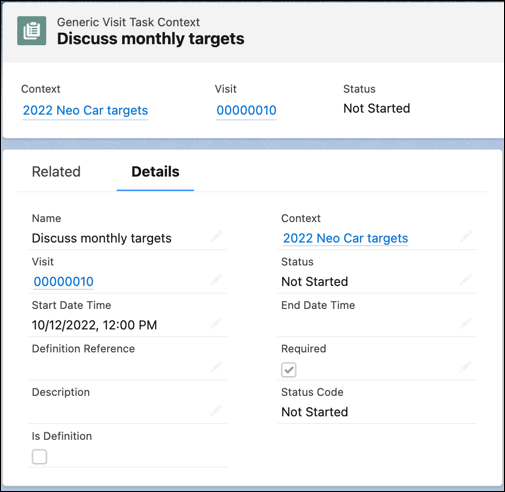
From the App Launcher, find and select Generic Visit Task Context,
and then click New.
-
Enter a name and a description for the task.
-
Click the down arrow for Context, select an object, and then select the required
record.
-
To mark the task as a definition, for Status, select Is
Defined.
-
To mark the task as mandatory, select Required.
-
Select the start date, the end date, and the time.
-
Save your changes.
You can view the list of Generic Visit Task Context records related to a task on the
Generic Visit Task Context Relations related list of the task.