---
schema_version: "1"
id: 8a97b6c22fa4cc4546f6396aa912b3ad0a4a0be777166a4deecf1183c1824142
title: Customize the Lead Page for Automotive Cloud
collection: admin
version: current
locale: en-us
portal_url: https://docs.salesforce.com/admin/current/en-us/ind/264-0-0/auto_customize_lead_page_layout.md
canonical_url: https://help.salesforce.com/s/articleView?id=ind.auto_customize_lead_page_layout.htm&release=264.0.0&type=5
source_site: help.salesforce.com
content_type: documentation
content_hash: ff4ad0708dc1d5f1b54f599d3464d7a53cfc01488b706f582990d9f0c84d578d
description: Capture key information about when a lead is interested in buying, selling, or trading in vehicles and parts. Add relevant fields to the page layout of a Lead record. Add the Lead Products and Lead Preferred Sellers related lists to the page layout to capture information about the items the lead is interested in, the dealers they prefer, and the accounts that provided the leads.
products:
- Automotive
release: "264"
---
# Customize the Lead Page for Automotive Cloud
Capture key information about when a lead is interested in buying, selling, or trading in vehicles and parts. Add relevant fields to the page layout of a Lead record. Add the Lead Products and Lead Preferred Sellers related lists to the page layout to capture information about the items the lead is interested in, the dealers they prefer, and the accounts that provided the leads.
### Required Editions
Available in: Enterprise, Unlimited, and Developer Editions.
User Permissions Needed
To customize page layouts:
Customize Application
1. From Setup, go to Object Manager.
2. Search for and select **Lead**.
3. Click **Page Layouts** and select a page layout.
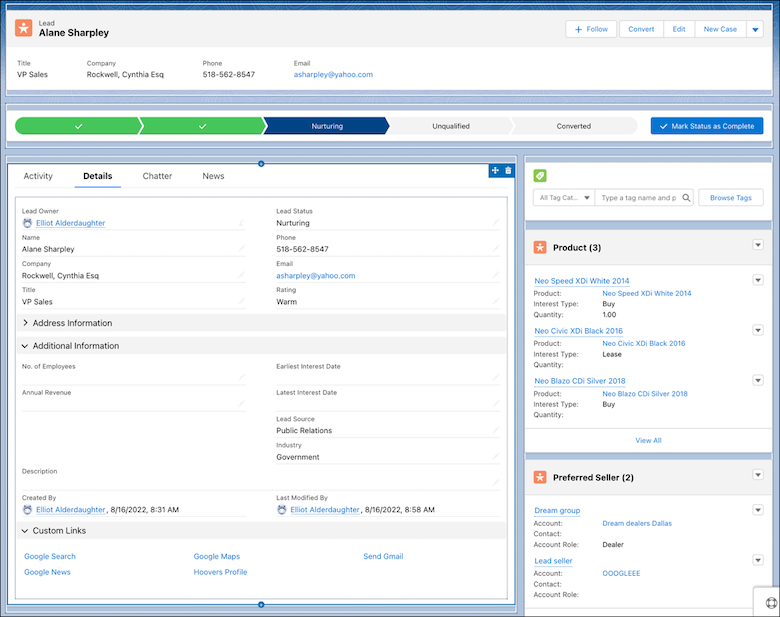
4. Drag the **Earliest Interest Date** and **Latest Interest Date** fields from the palette onto the Lead Detail section on the page.
5. Drag the **Products**, **Preferred Sellers**, and **Service Appointments** related lists from the palette onto the Lead Related Lists section on the page.
6. Drag the **Schedule Test Drive** button from the palette onto the Standard Buttons section of the page.
7. Remove the **Schedule Appointment** quick action from the page.Drag the **Related Lists** component onto the right sidebar area on the page. Or, add a **Related** tab in the main region, and add the **Related Lists** component to that tab.

Important This quick action automatically gets added to the page layout when you enable Salesforce Scheduler but launching this action would allow you to only use the default flow for appointment scheduling. To use the predefined test drive appointment flow unique to Automotive Cloud, remove this action and add the Schedule Test Drive button to the page.
8. Save your changes.
9. Open a Lead record, and click **Edit Page**.
10. Drag the **Related Lists** component onto the right sidebar area on the page. Or, add a **Related** tab in the main region, and add the **Related Lists** component to that tab.

Tip It’s easier for sales personnel and dealer reps to view information when you add the related lists to the right sidebar because the related lists appear as cards showing key details of records.
11. Drag the **Interest Tags** component to an area of the page, preferably to the right sidebar.
12. Select the following.
- Enter a title.
- To let users search for interest tags, select **Show Search**.
- Enter the maximum number of tag categories to display in the component. Users can expand the list to see more.
- Enter the maximum number of interest tags to display in the component. Users can expand the list to see more.
13. Save your changes.
14. To apply the changes, click **Activation**.
#### See Also
- [_Salesforce Help_: Capture Lead Information at a Granular Level](https://help.salesforce.com/s/articleView?id=ind.auto_line_item_preferred_seller.htm&release=264.0.0&type=5 "Capture all the information that leads—prospective customers—typically convey, such as the period during which they're interested in a business transaction, and the type of products and services they’re interested in. You can also capture the lead’s preferred dealers and the source that provided the lead. Leads can be sourced organically from a company’s website, from events and product launches, and via referrals. Leads can also be sourced from lead generation companies or digital marketing agencies who share high-quality leads with automotive companies. You can relate the lead provider account with a lead to understand the source of the lead. When a lead is converted into an opportunity, providing dealers visibility into the lead’s preferred products and sellers greatly enhances the sales process.")