---
schema_version: "1"
id: ccd39141211c845159e6b9277f290a776a5995297ee56f85a309b9f5d8879d05
title: Create Internal Organizational Units in Automotive Cloud
collection: admin
version: current
locale: en-us
portal_url: https://docs.salesforce.com/admin/current/en-us/ind/264-0-0/auto_create_internal_business_org.md
canonical_url: https://help.salesforce.com/s/articleView?id=ind.auto_create_internal_business_org.htm&release=264.0.0&type=5
source_site: help.salesforce.com
content_type: documentation
content_hash: e9ddbd8841f23449deac23acb495f72099048388bbd1b026d66def422fe57e05
description: In Automotive Cloud, stakeholder groups are modeled as accounts. To simplify reporting and target-setting, create internal organizational units that identify your departments or account structures. For example, you can create an internal organizational unit for all sales dealer accounts, and each dealership account can be related to the unit.
products:
- Automotive
release: "264"
---
# Create Internal Organizational Units in Automotive Cloud
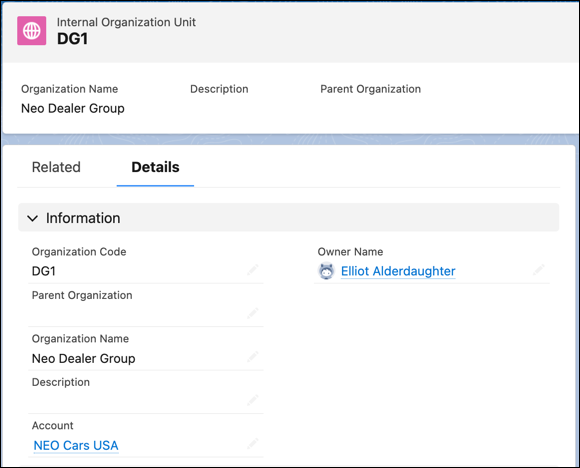
In Automotive Cloud, stakeholder groups are modeled as accounts. To simplify reporting and target-setting, create internal organizational units that identify your departments or account structures. For example, you can create an internal organizational unit for all sales dealer accounts, and each dealership account can be related to the unit.
### Required Editions
Available in: Enterprise, Unlimited, and Developer Editions.
User Permissions Needed
To create internal organization units:
Automotive Foundation User permission set
1. From the App Launcher, find and select **Internal Organization Units**.
2. Click **New**.
3. Search for and select an account.
4. Enter a name for the unit.
5. Enter an organization code.
6. Save your changes.

Example
Neo Cars USA is a parent account and there are multiple child accounts linked to this parent account. For example, Neo Seattle, Neo San Francisco, Neo Miami, and Neo Dallas are dealerships in different geographical locations but they all roll up to the Neo Cars USA account.
To organize accounts by geography, you can create the following records.
- Record 1
- Organization Code: 0001
- Organization Name: Neo West USA Account Group
- Account: Neo Seattle
- Record 2
- Organization Code: 0001
- Organization Name: Neo West USA Account Group
- Account: Neo San Francisco
- Record 3
- Organization Code: 0001
- Organization Name: Neo South USA Account Group
- Account: Neo Miami
- Record 4
- Organization Code: 0001
- Organization Name: Neo South USA Account Group
- Account: Neo Dallas