---
schema_version: "1"
id: bc45f3c688f0c7bfe29e0a42da1586fbbb91027b0f648b15e42ca1413d158f05
title: Create Business Brands in Automotive Cloud
collection: admin
version: current
locale: en-us
portal_url: https://docs.salesforce.com/admin/current/en-us/ind/264-0-0/auto_business_brands.md
canonical_url: https://help.salesforce.com/s/articleView?id=ind.auto_business_brands.htm&release=264.0.0&type=5
source_site: help.salesforce.com
content_type: documentation
content_hash: 8b0d5b7b6a103aa747326ec780b978b900137931c1c52b4b95e9a1de1548e484
description: An original equipment manufacturer (OEM) can have multiple product offerings associated with different customer-facing brands. Typically, brands are used to capture the customer’s interest and provide key differentiators for the various types of vehicles and accessories sold by an automotive company. Create Business Brand records to capture brand information. You can also create a parent brand and associate multiple brands with it.
products:
- Automotive
release: "264"
---
# Create Business Brands in Automotive Cloud
An original equipment manufacturer (OEM) can have multiple product offerings associated with different customer-facing brands. Typically, brands are used to capture the customer’s interest and provide key differentiators for the various types of vehicles and accessories sold by an automotive company. Create Business Brand records to capture brand information. You can also create a parent brand and associate multiple brands with it.
### Required Editions
Available in: Enterprise, Unlimited, and Developer Editions.
User Permissions Needed
To create business brands:
Automotive Foundation User permission set
To view the Business Brand object in the App Launcher, make the data protection details available in the records. See [Make Data Protection Details Available in Records](https://help.salesforce.com/s/articleView?id=ind.admin_make_data_protection_details_available_in_records.htm&type=5&language=en_US).
1. From the App Launcher, find and select **Business Brands**.
2. Enter a name.
3. Enter an Org ID that helps you identify the brand internally.
4. Search for and select a parent brand.
5. Click **Save & New**, and create similar records for multiple brands.

Example
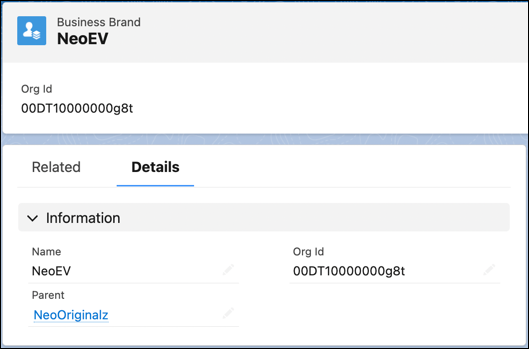
Neo Cars is an OEM that wants to track multiple brands in their org. They have multiple product offerings under each brand that includes vehicles, parts, and accessories.
Neo Cars creates these records.
- Parent Brand: Neo EV Cars
- Parent Brand: Neo Original Cars
- Neo Original Sports
- Neo Original Utility
- Parent Brand: Neo Luxury Cars
- Parent Brand: Neo Ultra Luxury Cars
When you create Product records, you can specify the Business Brand for those records. If your admin sets up sharing rules, you can selectively share brand-specific product information with specific stakeholder groups such as dealers and customers.