---
schema_version: "1"
id: be9810a7db28764087babc1d095c244fa38b83c7d70f2c7250d07eb317628a5f
title: Add Timelines to a Vehicle Record in Automotive Cloud
collection: admin
version: current
locale: en-us
portal_url: https://docs.salesforce.com/admin/current/en-us/ind/264-0-0/auto_add_timeline_vehicle_page.md
canonical_url: https://help.salesforce.com/s/articleView?id=ind.auto_add_timeline_vehicle_page.htm&release=264.0.0&type=5
source_site: help.salesforce.com
content_type: documentation
content_hash: 71499fa45997855143fe3d7999c2e0d784681bbd4c434316b3efbd737c99ee59
description: Add the Timeline component to a Vehicle record page to create a chronological view of events and activities derived from warranties, stakeholder information, asset-related information, and more. If you have multiple Vehicle page layouts for different users, such as dealers, service agents, and sales executives, make sure that you add relevant timelines to the page layouts. For example, if you create a timeline that shows information about warranties, recalls, and services, you can add the timeline to the Vehicle page layout for the service technician and service dealer profiles.
products:
- Automotive
release: "264"
---
# Add Timelines to a Vehicle Record in Automotive Cloud
Add the Timeline component to a Vehicle record page to create a chronological view of events and activities derived from warranties, stakeholder information, asset-related information, and more. If you have multiple Vehicle page layouts for different users, such as dealers, service agents, and sales executives, make sure that you add relevant timelines to the page layouts. For example, if you create a timeline that shows information about warranties, recalls, and services, you can add the timeline to the Vehicle page layout for the service technician and service dealer profiles.
### Required Editions
Available in: Enterprise, Unlimited, and Developer Editions.
User Permissions Needed
To configure and customize Timeline:
Customize Application
1. On a Vehicle record page, from Setup, select **Edit Page**.
2. Drag the Timeline component onto the editable content area.
3. To select the timeline configurations to make available, in the component properties panel, click **Select**.
Only active timeline configurations are available for selection.
4. In the Timeline window, select the required configurations, and then click **OK**.
You can select up to five timeline configurations.
5. Save and activate your changes.
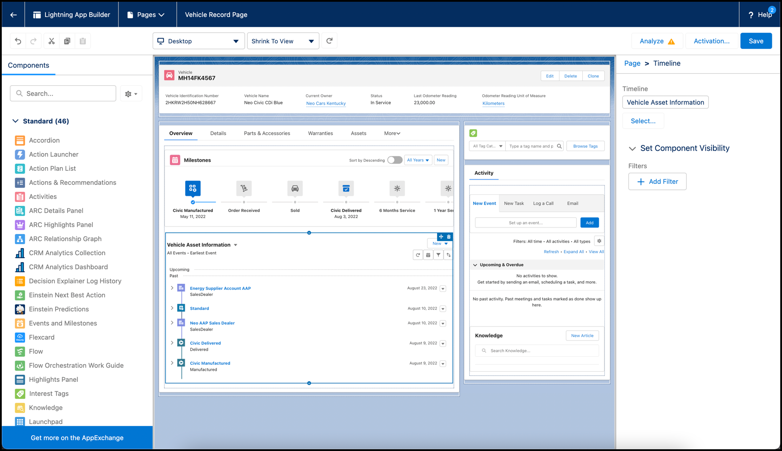
Based on the type of access you grant, users can create and edit timeline events directly from the component without leaving the Vehicle record page.
#### See Also
- [_Salesforce Help_: Add and Edit Timeline Records on Vehicle](https://help.salesforce.com/s/articleView?id=ind.auto_timeline_user_vehicle.htm&release=264.0.0&type=5 "View records and key activities associated with a vehicle on a Timeline. You can add and edit records without losing the context of the vehicle and you can sort and filter past and upcoming events by time and event type. You can also switch between multiple timelines. You can view up to 2000 records on a single timeline.")