---
schema_version: "1"
id: 5c46ecc8d52896f49108e0c5d765a47d6fd190397df612ff610126981e2734a9
title: Customize the Business Profile Page for Automotive Cloud
collection: admin
version: current
locale: en-us
portal_url: https://docs.salesforce.com/admin/current/en-us/ind/264-0-0/auto_add_business_profile_fields.md
canonical_url: https://help.salesforce.com/s/articleView?id=ind.auto_add_business_profile_fields.htm&release=264.0.0&type=5
source_site: help.salesforce.com
content_type: documentation
content_hash: f0b5daf66dc496a646901961dc7a3699f3cba3f52ffc5e626024eee59b2aff8a
description: Develop a business profile for all dealer accounts that are associated with your automotive business. Add fields to the Business Profile record page layout to capture key information about sales and service dealers.
products:
- Automotive
release: "264"
---
# Customize the Business Profile Page for Automotive Cloud
Develop a business profile for all dealer accounts that are associated with your automotive business. Add fields to the Business Profile record page layout to capture key information about sales and service dealers.
### Required Editions
Available in: Enterprise, Unlimited, and Developer Editions.
User Permissions Needed
To customize page layouts:
System Administrator
Automotive Cloud provides default picklist values for Business Partner Type and Service Type. But you can add more values or deactivate the existing ones.
1. From Setup, go to Object Manager.
2. Search for and select **Business Profile**.
3. Click **Page Layouts** and select a page layout.
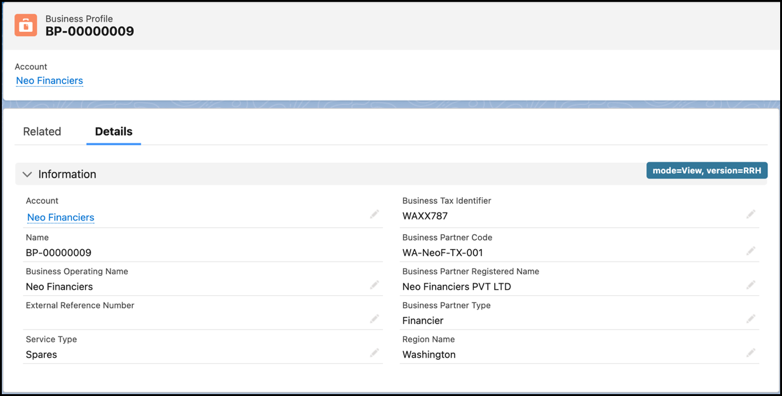
4. Drag the following fields from the palette onto the Business Profile Detail section on the page.
Business Partner Type, External Reference Number, Business Partner Registered Name, Service Type, Service Territory, Business Partner Code, and Region Name.
5. Save your changes.
6. Go back to Business Profile and click **Fields and Relationships**.
7. Click **Region Name** and click **New** in the Region Name Picklist Values section.
8. Add picklist values in the text box and click **Save**.
Examples include Texas, New York, North Carolina.
#### See Also
- [_Salesforce Help_: Create Business Profiles](https://help.salesforce.com/s/articleView?id=ind.auto_create_businness_profiles.htm&release=264.0.0&type=5 "In Automotive Cloud, you can model all stakeholders for an automotive company as Account records. To capture additional information about each stakeholder account, primarily dealers, create Business Profile records. Each dealer can have a Business Profile record where you can add details, such as the type of services provided by the dealer, and the registered name and code of the account.")