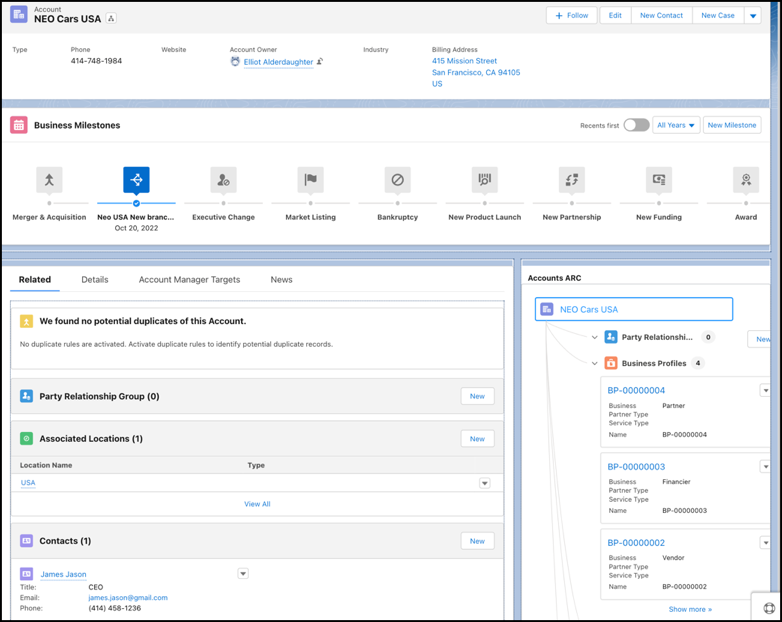
Customize the Account record page layout to get a snapshot of all key information that’s
relevant to your automotive business. Add related lists to view party relationship groups,
vehicles, visits, and more. View the life events of a person account or the business milestones of
a business account with the Events and Milestones component. Visualize relationships among people
and assets by presenting them on the ARC Relationship Graph component.
Required Editions
| Available in: Enterprise, Unlimited, and Developer
Editions. |
| User Permissions Needed |
| To customize page layouts: |
Customize Application |
-
From Setup, go to Object Manager.
-
Search for and select Account.
-
Click Page Layouts and select a page layout.
-
Drag these related lists from the palette onto the Account Related Lists section on the
page.
- Party Relationship Groups
- Associated Locations
- Contacts
- Engagement Interactions
- Sales Agreements
- Assets
- Asset Account Participants
- Vehicles
- Visits
- Service Appointments
-
Save your changes.
-
Open an Account record and click Edit Page.
-
Drag the Related Lists component onto the right sidebar area of the
page. Or, add a Related tab in the main region and add the
Related Lists component to that tab.
-
Drag the Events and Milestones component onto the main region.
-
Drag the ARC Relationship Graph component onto the right
sidebar.
-
In the properties panel, enter a label.
-
Select an active graph in the Graph Name field.
-
Save your changes.
-
To apply the changes, click Activation.