---
schema_version: "1"
id: 8c43e1e90e9a444f078529ff91f499d03deebcea7d0d40a6983e5cdefb5cff9d
title: Create an Asset Warranty
collection: admin
version: current
locale: en-us
portal_url: https://docs.salesforce.com/admin/current/en-us/ind/264-0-0/associate_warranty_term_asset_task.md
canonical_url: https://help.salesforce.com/s/articleView?id=ind.associate_warranty_term_asset_task.htm&release=264.0.0&type=5
source_site: help.salesforce.com
content_type: documentation
content_hash: 19b1197d97d6f8e77f6b757436485405cd0f216819e8b471ca6a617f3dbacc7d
description: To assign a warranty term to an asset, create an asset warranty. Specify any extensions or exclusions for the assigned warranty term.
products:
- Manufacturing
release: "264"
---
# Create an Asset Warranty
To assign a warranty term to an asset, create an asset warranty. Specify any extensions or exclusions for the assigned warranty term.
### Required Editions
Available in: Enterprise, Unlimited, and Developer Editions
User Permissions Needed
To create and update Asset Warranties:
Warranty Lifecycle Management permission set
1. From an Asset record, on the Asset Warranties related list of the Related tab, click **New**.
2. Provide these details.
| Field | Description |
| --- | --- |
| Warranty Term | The warranty term that this asset warranty term extends. |
| Start Date | The date on which cover under this asset warranty term starts. |
| End Date | The date on which this asset warranty term expires. |
| Asset | The asset this asset warranty term applies to. |
| Price Book | The price book associated with this asset warranty term. |
| Warranty Type | The type of the warranty. |
| Exclusions | Description of any exclusions. |
| Exchange Type | The type of exchange offered by this asset warranty term. |
| Transferable | Indicates whether the warranty term can be transferred to a new owner. |
| Labor Covered | The percentage of labor covered. |
| Labor Covered End Date | The date on which cover for labor ends. |
| Parts Covered | The percentage of parts covered. |
| Parts Covered End Date | The date on which cover for parts ends. |
| Expenses Covered | The percentage of expenses covered. |
| Expenses Covered End Date | The date on which cover for expenses ends. |
3. Save your changes.
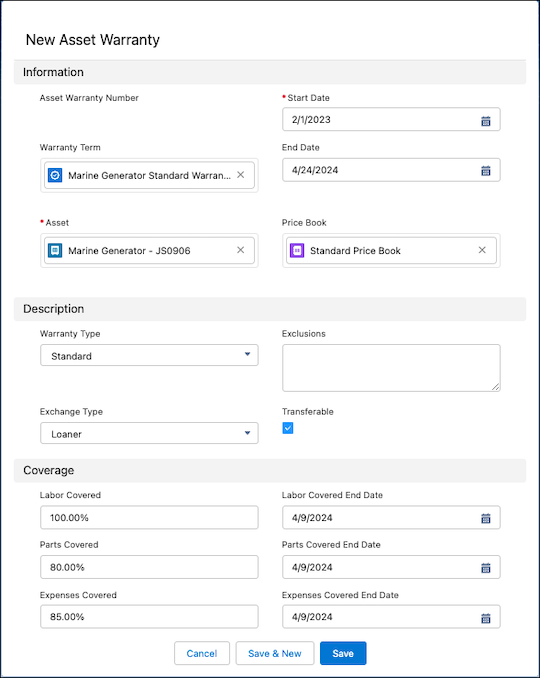

Example
The warranty manager at Thomas Railways Equipment, Inc., a manufacturer, defines a warranty term to cover all assets for their Pneumatic Drill product with the following details.
- Warranty Term Name: Pneumatic Drill Standard Warranty
- Active: True
- Warranty Type: Standard
- Labor Covered: 60%
- Expenses Covered: 50%
She creates a product warranty term to assign the warranty term to the Pneumatic Drill product. After a partner requests the warranty manager to extend the labor coverage for their Pneumatic Drill B62 asset to 85%, the warranty manager creates an asset warranty term. She specifies the following details for the asset warranty:
- Warranty Term: Pneumatic Drill Standard Warranty
- Asset: Pneumatic Drill B62
- Labor Covered: 85%
The asset warranty extends the labor covered for the Pneumatic Drill B62 asset to 85% but the expenses covered for the asset remain 50% as specified in the standard warranty term.