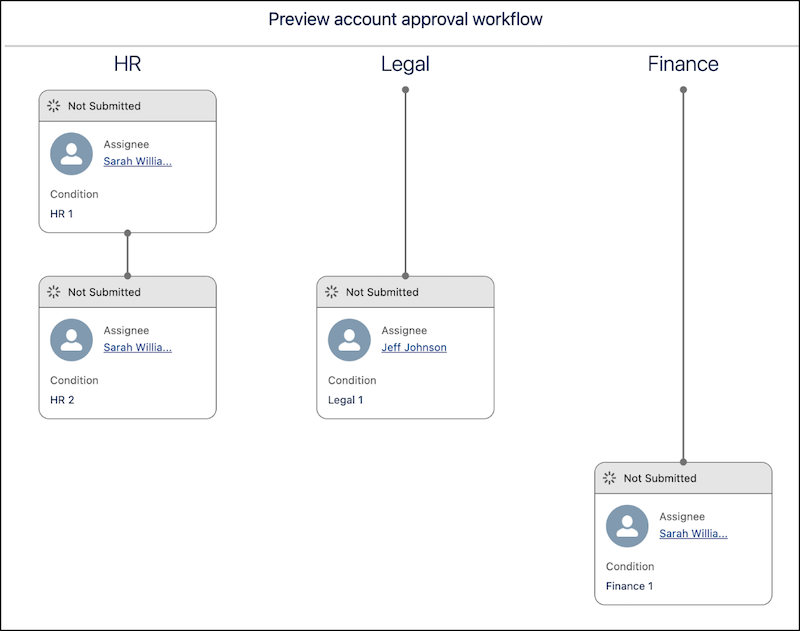
Review the steps, chains, and approvers for a record before you submit it. Preview
Approvals evaluates the record's field values and simulates the approval steps triggered. During
the preview, approval-related records aren’t created or modified.
Required Editions
| Available in: Lightning Experience |
| Available in: Enterprise, Unlimited, and Developer Editions where
Advanced Approvals is enabled |
Approval steps are shown in sequence within each chain, along with their dependencies. The
step dependencies are evaluated by using the step entry conditions configured in the
associated flow.
The preview window shows the following for each step:
- Approval Chain: The chain associated with the step.
- Assignee: The user, group, or queue assigned to approve the step.
- Status: The status of the approval step, which is Not Submitted by default.
- Approval Condition: The name of the condition that triggered the step.
- Example: How Step Conditions Affect a Preview
See how step entry conditions in your workflow determine the order and visibility of approval steps during preview.
- Preview an Approval Workflow
To visualize the approval journey of your submission, add the Approval Workflow component to your record page. The preview sorts steps by their chain name and shows them in their sequence order.