
Amend Push Event is a push event setting that transitions a Running push event to the Amended state when its preceding callout is amended via a supplemental order. If the preceding amended callout has compensation tasks configured to run, those new tasks don't have to wait for the previous push event to complete before executing.
Often, when a callout is amended, its compensation task, which is defined in its amend plan definition, is also a callout. That callout sends the amended information to the external system. When that original callout is amended, the following push event can still be in the Running state. In this scenario, the new amended callout from the amend plan definition waits for the preceding push event to complete (if that push event doesn't have the Amend Push Event setting enabled). The wait occurs because Order Management expects the external system to respond to the now-outdated request before the new amended callout can be sent out. Use the Amend Push Event setting so that your push events can transition to the Amended state along with the preceding callout.
Here's an example diagram showing the orchestration plan of a supplemental order. The orchestration plan shows the amended callout and the subsequent amended push events that are created within the supplemental order:
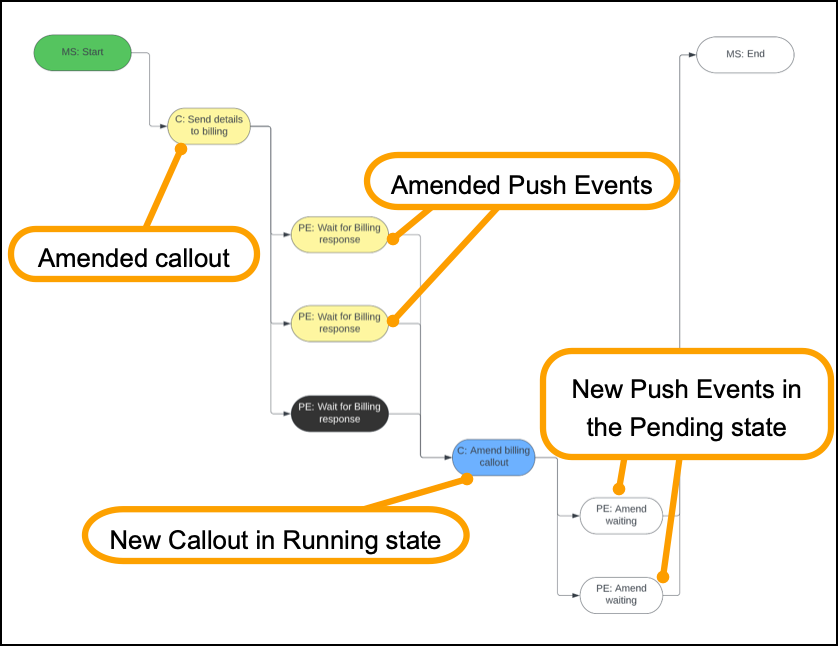
Amend Push Event Logic
Industries Order Management processes the Amend Push Event setting according to the following cancel and amend behavior logic:
-
During a plan freeze: Amend Push Event acts the same way as the Smart Freeze push event setting. For example, a Running push event transitions to the Frozen-Running state. (For more information about Smart Freeze, see In-Flight Amendment: Changing the Default Behavior of a Running Order Item.)
-
After a supplemental order submit:
-
If a Frozen-Running push event depends on a callout or autotask that transitions to the Amended state, then the push event transitions to the Amended state. Any compensation tasks are added from the Amend Plan Definition. Any compensation tasks that were already running (such as from an earlier supplemental order submit) continue to run and aren't marked as Amended.
-
If there are multiple callout or autotask predecessors, if at least one callout or autotask transitions to the Amended state, the new rule executes.
-
Create a Push Event with the Amend Push Event Setting
When setting up your orchestration, create a push event orchestration item definition, and in the Cancel/Amend Behaviour field, select Amend Push Event, and save your work.
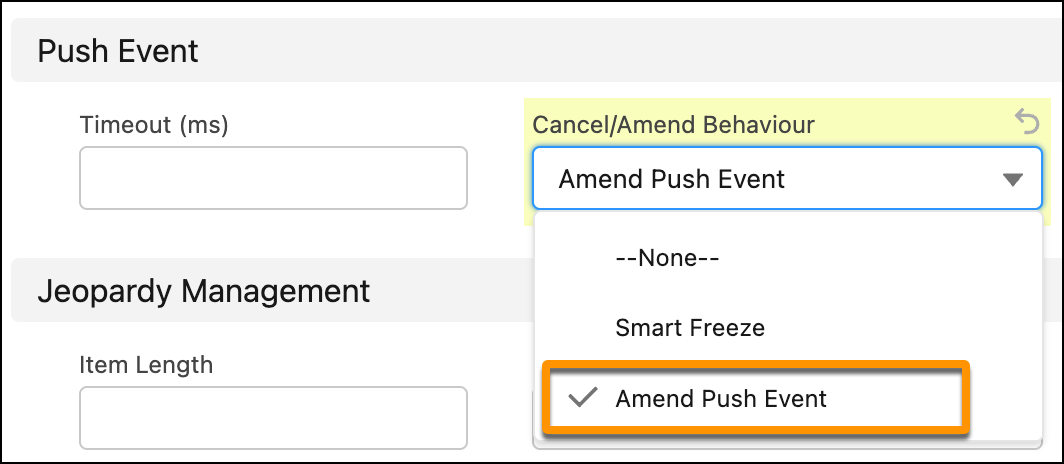
For more information about creating orchestration items, see View or Create an Orchestration Item Definition and Add Orchestration Items to the Plan.

Navigate to the Object Manager for Orchestration Item Definitions. In the Fields & Relationships section, click Cancel/Amend Behavior. Then, in the Values section, click New and add the "Amend Push Event" pick list value. For more information about adding picklist values, see Add or Edit Picklist Values.