---
schema_version: "1"
id: 08ee042e9c37b7bd6ce7ee3c8063de5485a64c1a17667919dd0e39f0d5c1999e
title: Customize the Action Launcher in the Contact Center
collection: admin
version: current
locale: en-us
portal_url: https://docs.salesforce.com/admin/current/en-us/ind/264-0-0/admin_contact_center_customize_the_action_launcher.md
canonical_url: https://help.salesforce.com/s/articleView?id=ind.admin_contact_center_customize_the_action_launcher.htm&release=264.0.0&type=5
source_site: help.salesforce.com
content_type: documentation
content_hash: 7105af92c08ae5f2c5e3278cc45bd4ef426a58988940892772ecfc200b49a3ae
description: Create your own quick actions and configure them in the Contact Center Action Launcher component. For example, if the contact center agent frequently gets requests to add patient medications, create a deployment from the Action Launcher in Setup.
products:
- Health
release: "264"
---
# Customize the Action Launcher in the Contact Center
Create your own quick actions and configure them in the Contact Center Action Launcher component. For example, if the contact center agent frequently gets requests to add patient medications, create a deployment from the Action Launcher in Setup.
### Required Editions
Available in: Lightning Experience
Available in: Enterprise and Unlimited Editions with Health
Cloud
User Permissions Needed
To use the Contact Center for Health Cloud
Contact Center for Health Cloud permission set
1. From Setup, in the Quick Find box, enter Action Launcher, and then click **Deployments**.
2. Click **New Deployment**, and then click **Next**.
3. Enter a label. The API name is auto-updated.
4. Select whether you want to add Buttons, flows, links, and quick actions, Omniscripts, or Components. You can select any or all of them. Click **Next**.
5. Select the object for which you want to show the actions. For the Contact Center, select Account as the object, and then click **Next**.
6. From the list of available actions, screen flows or Omniscripts, choose items that appear in the Action Launcher search results. Click **Next**.
7. Select frequently used actions to pin to the Action Launcher.
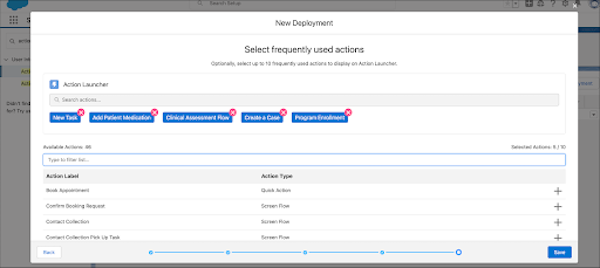
8. Save your changes.
9. From the App Launcher, go to the Contact Center and open the person account’s record page in Lightning App Builder.
10. If the Action Launcher component is not already placed on the page, drag this component from the component list to the page.
11. In the Properties pane, in Action Launcher Deployment, select the deployment you configured.
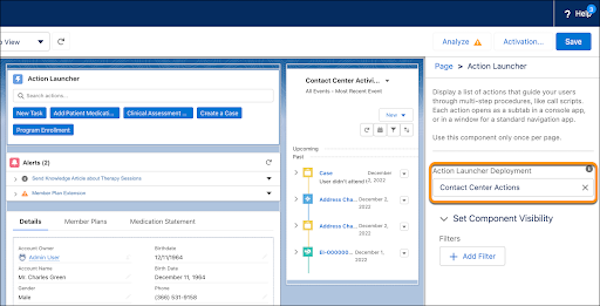
12. Save your changes.
#### See Also
- [Create an Action Launcher Deployment](https://help.salesforce.com/s/articleView?id=ind.create_an_action_launcher_deployment.htm&type=5&language=en_US)