A service resource is an agent or crew that performs a work type at a
service territory. A service resource can also refer to a particular meeting room, facility, or
even an asset assigned to a service territory. In Advanced Therapy Management, service resources
are medical staff modeled as an asset at a service territory where a work type, such as apheresis,
is performed.
Required Editions
|
Available in: Lightning Experience
Available in: Enterprise and Unlimited Editions with Health Cloud
or Life Sciences Cloud
|
| User Permissions Needed |
| To create Service Resource records: |
Create, Read, Edit, Delete on Service Resource records |
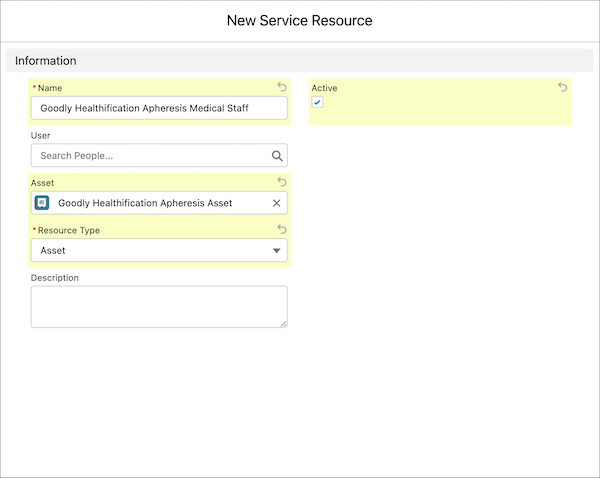
First create a record for the asset, and then create a service resource with the associated
asset.
-
From the App Launcher, find and select Assets.
-
Click New.
-
Add a name for the asset. For example, Goodly Healthification Apheresis
Asset.
-
Associate the asset with an account. For example, select the account of the service
territory.
-
Save your changes.
-
From the App Launcher, find and select Service Resource.
-
Click New.
-
Add a name for the service resource. For example, Goodly Healthification
Apheresis Medical Staff.
-
Select the asset you created in the previous steps.
-
In Resource Type, select Asset.
-
Select Active.
-
Save your changes.
Repeat the steps to create assets and service resources for each work procedure step that is
performed at a service territory.