---
schema_version: "1"
id: dec54a032ae1398296af11cd80ca67fda97b9c2e51e48ff5020fd060185369f1
title: Specify the Default Price Book for Account Manager Targets
collection: admin
version: current
locale: en-us
portal_url: https://docs.salesforce.com/admin/current/en-us/ind/264-0-0/admin_account_manager_targets_price_book.md
canonical_url: https://help.salesforce.com/s/articleView?id=ind.admin_account_manager_targets_price_book.htm&release=264.0.0&type=5
source_site: help.salesforce.com
content_type: documentation
content_hash: b9624adbbe00a406a743020d5b3a23126bc2f13f641b1639debcb54f82c66673
description: Specify the default price book for the account manager targets that are distributed by product. The selected price book is populated by default in all the target distributions when account managers distribute a target by product. By selecting a default price book, account managers don’t need to manually select a price book for each target distribution. Account managers can replace the default price book with another one in a target distribution.
products:
- Manufacturing
release: "264"
---
# Specify the Default Price Book for Account Manager Targets
Specify the default price book for the account manager targets that are distributed by product. The selected price book is populated by default in all the target distributions when account managers distribute a target by product. By selecting a default price book, account managers don’t need to manually select a price book for each target distribution. Account managers can replace the default price book with another one in a target distribution.
### Required Editions
Available in: Enterprise, Unlimited, and Developer Editions
User Permissions Needed
To select the default price book for account manager targets:
Customize Application
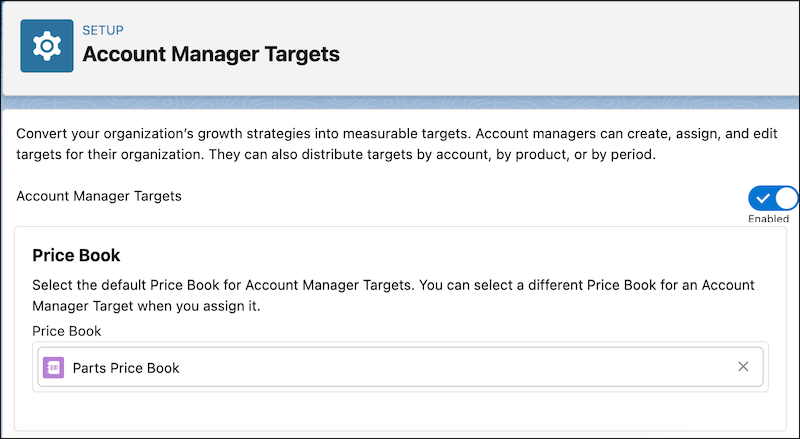
1. From Setup, in the Quick Find box, enter Account Manager Targets in the Quick Find box, and then select **Account Manager Targets**.
2. In the Price Book section, search for and select a price book.
#### See Also
- [Distribute Account Manager Targets](https://help.salesforce.com/s/articleView?id=ind.user_account_manager_targets_distribute.htm&release=264.0.0&type=5 "You can distribute target assignments by accounts and products. You can also distribute an overall target by time period, or a target assignment for a product or an account by time period.")