---
schema_version: "1"
id: e6095fe582fb9706498e5a30074c2b56b135b97c4feea4e640e371c268fa1f24
title: Choose the Frequency for Distributing Account Manager Targets
collection: admin
version: current
locale: en-us
portal_url: https://docs.salesforce.com/admin/current/en-us/ind/264-0-0/admin_account_manager_targets_distribution_frequency.md
canonical_url: https://help.salesforce.com/s/articleView?id=ind.admin_account_manager_targets_distribution_frequency.htm&release=264.0.0&type=5
source_site: help.salesforce.com
content_type: documentation
content_hash: a4698985a78c4439a1563ac20be7280d4ab037c6ea4940e73f0aa84c801330c6
description: Select the frequency of the periods by which the account manager targets are distributed when an account manager distributes targets by period. The value of a target is automatically divided among all the periods with the selected frequency equally. Account managers can update the distributed target values in different periods.
products:
- Manufacturing
release: "264"
---
# Choose the Frequency for Distributing Account Manager Targets
Select the frequency of the periods by which the account manager targets are distributed when an account manager distributes targets by period. The value of a target is automatically divided among all the periods with the selected frequency equally. Account managers can update the distributed target values in different periods.
### Required Editions
Available in: Enterprise, Unlimited, and Developer Editions
User Permissions Needed
To modify target distribution frequency:
Customize Application
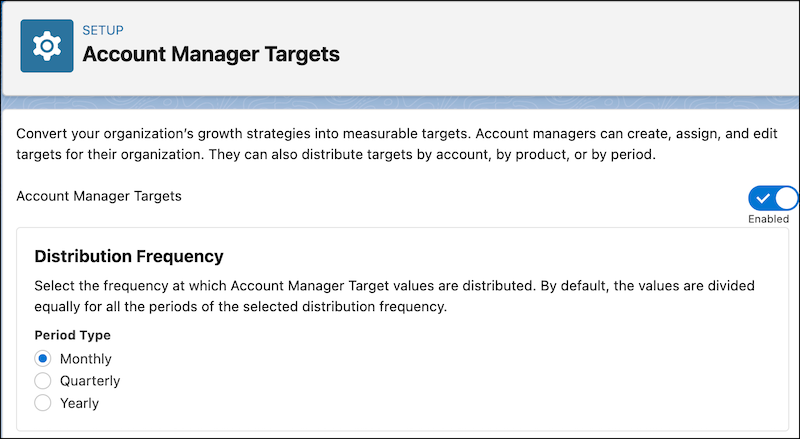
1. From Setup, in the Quick Find box, enter Account Manager Targets, and then select **Account Manager Targets**.
2. In the Distribution Frequency section, select a period type.
- Monthly
- Quarterly
- Yearly
The default period type is Monthly.

Important If you change the distribution frequency, the new frequency will only apply to the targets created after the change.
#### See Also
- [Distribute Account Manager Targets](https://help.salesforce.com/s/articleView?id=ind.user_account_manager_targets_distribute.htm&release=264.0.0&type=5 "You can distribute target assignments by accounts and products. You can also distribute an overall target by time period, or a target assignment for a product or an account by time period.")