View Advanced Account Forecasts

Track advanced account forecasts to spot patterns across various dimensions and compare forecast values between different periods. You can view forecast data for an advanced account forecast set use record broken down by dimensions and across different periods. You can switch between various measure groups to view forecasts for desired metrics.
Required Editions

Available in: Lightning Experience
Available in: Enterprise, Unlimited, and Developer Editions
User Permissions Needed
To view advanced account forecasts Read permission on Advanced Account Forecast

To view the forecast data, wait for the data processing engine run to complete. The Advanced Account Forecast Set Use records show data only after the data processing engine definitions runs are completed.

  1. From the App Launcher, find and select Advanced Account Forecast Set Uses.
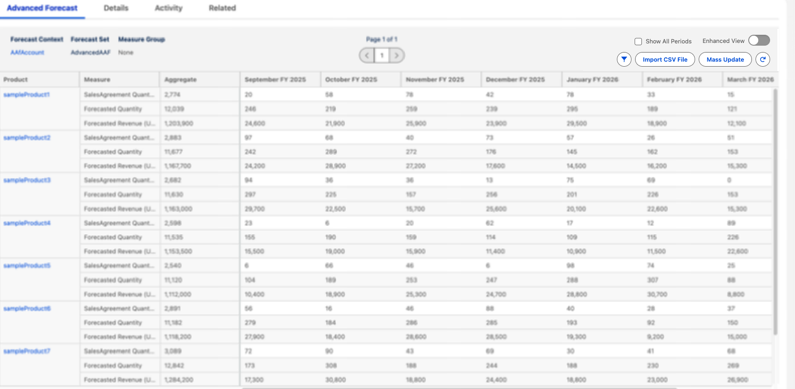
  2. Open an advanced account forecast set use record, and go to the Advanced Forecast tab.
  3. To view forecasts specific to measures that are part of a group, select a measure group.
    Advanced account forecasts
  4. To view the forecast data for all periods, click Show All Periods.
  5. If the forecast data spans multiple rows, click the forward and back arrows to navigate between pages.
  6. To switch to the Enhanced view, turn on the toggle. The default view doesn’t include many features that come with the Enhanced view.

In the Enhanced view, you can resize columns, and those widths are retained on your system until you reset them. You can also undo or redo cell edits, scroll through large datasets while keeping key rows and columns fixed, navigate across cells using your keyboard, and view data more clearly with a simplified header layout.

Note
Note In Advanced Account Forecast, only the first 1,000 adjustment records are shown in the grid. To view more, use filters such as product, time period, or measure group to narrow the results.