
Assign permission sets to internal users and partners based on their required level of access to Advanced Account Forecasting and related features. Control access to the Mass Update and Import CSV buttons for Advanced Account Forecasting for your users by using permission sets. Before you assign permission sets, ensure that Advanced Account Forecasting and Data Pipelines are enabled.
Required Editions
| Available in: Lightning Experience |
| Available in: Enterprise, Unlimited, and Developer Editions |
Permission Sets
Assign these permission sets to the appropriate users.
| Permission Set | Description |
|---|---|
| Data Pipelines Base User | Gives users access to Data Processing Engine. |
| Manufacturing Advanced Account Forecasting | Gives users access to the advanced account forecasting objects and features. |
| Manufacturing Advanced Account Forecast For Community | Gives Experience Cloud users access to the advanced account forecasting objects and features. |

Configure Forecast Update Access
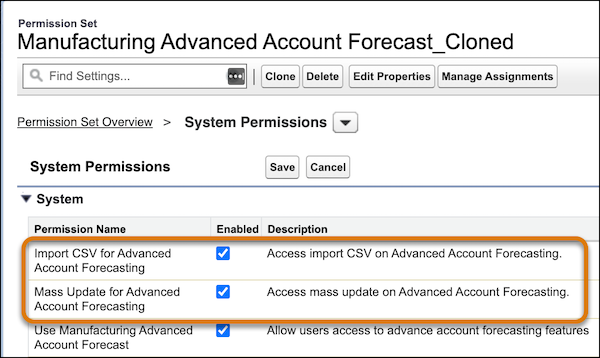
To determine which users can mass update forecasts and import forecasts from CSV files, you can clone a standard permission set, and then enable or disable these system permissions.
- Mass Update for Advanced Account Forecasting
- Import CSV for Advanced Account Forecasting
Considerations for Data Processing Engine Permissions
For data processing engine (DPE), review these additional permission considerations.
- If you added custom objects as data sources for data processing engine definitions, enable all settings for that object. For example, to use Quotes as a data source, enable Quotes in Setup.
- Users with the Analytics Cloud Integration User profile need Read access on all the objects and fields selected in the Data Source node.
- Ensure that field-level security is correctly assigned to users for all the fields used in a DPE definition.
- To define target objects and fields in a writeback node, and define the related field mapping, specify the writeback user in the writeback node. The writeback user must have Create access on all the target objects, fields, and related objects.