---
schema_version: "1"
id: 386c97fc05de9c1cca5778bed342442cc3c207d39a45123ff6d6937c9f480f9e
title: Define a Period Group for Advanced Account Forecasting
collection: admin
version: current
locale: en-us
portal_url: https://docs.salesforce.com/admin/current/en-us/ind/264-0-0/aaf_admin_period_group_task.md
canonical_url: https://help.salesforce.com/s/articleView?id=ind.aaf_admin_period_group_task.htm&release=264.0.0&type=5
source_site: help.salesforce.com
content_type: documentation
content_hash: fcb23661d98d46e61ef1c605535d70af6bab8a361cc2219056703564d3d1d791
description: Period groups define the duration and the number of periods for which forecasts are generated and displayed. The duration of a period can be a week, a month, a quarter, or a year. You can specify the number of periods before or after the current period for which forecasts are generated. When you configure a forecast set, you select a period group to define the duration of the forecasts associated with that forecast set. You can use a period group in multiple forecast sets.
products:
- Manufacturing
release: "264"
---
# Define a Period Group for Advanced Account Forecasting
Period groups define the duration and the number of periods for which forecasts are generated and displayed. The duration of a period can be a week, a month, a quarter, or a year. You can specify the number of periods before or after the current period for which forecasts are generated. When you configure a forecast set, you select a period group to define the duration of the forecasts associated with that forecast set. You can use a period group in multiple forecast sets.
### Required Editions
Available in: Lightning Experience
Available in: Enterprise, Unlimited, and Developer Editions
User Permissions
Needed
To modify forecast settings:
Customize Application

Note
To create period groups with weekly periods, enable custom fiscal years for your org. See [Define a Custom Fiscal Year](https://help.salesforce.com/s/articleView?id=xcloud.admin_define_cfy.htm&type=5&language=en_US).
1. From Setup, in the Quick Find box, enter Advanced Account Forecasting, and then select **Advanced Account Forecasting**.
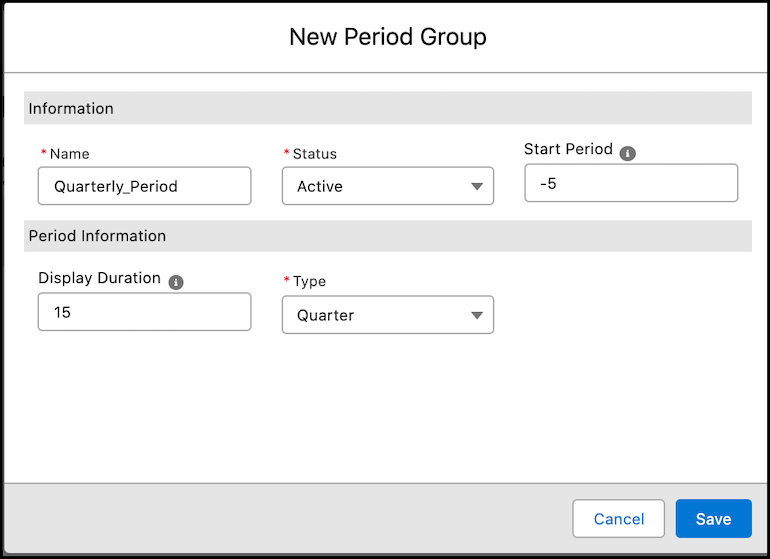
2. Go to the Period Groups tab, and click **New**.
3. Enter a name for the period group.
4. Select the status of the period group.
- Active
- Inactive
You can use only active period groups in forecast sets.
5. For Start Period, enter the number of periods before or after the current period for which forecasts are generated.
To generate forecasts from the current period, enter 0. To generate forecasts starting from a future period, enter a positive number. To generate forecasts starting from a past period, enter a negative number. For example, to generate forecasts from six periods after the current period, enter 6. To generate forecasts from six periods before the current period, enter -6.
6. For Display Duration, enter the number of periods for which forecasts appear in the forecast table.
7. For Type, select the frequency of a period.
- Week
- Month
- Quarter
- Year
The Week value is available only if custom fiscal years are enabled in your Salesforce org.
8. Click **Create**.

Example
The sales and service teams at a manufacturing company want to track forecasts based on three sets of requirements.
- Sales demand forecasts: The sales team wants to track quarterly sales demand forecasts for the next eight quarters, including the current one.
- Spare part inventory forecasts: The service team wants to track monthly spare part inventory forecasts for the past six months and the next six months.
- Service revenue forecasts: The service team wants to track the quarterly service revenue forecasts for the next eight quarters, including the current one.
The Salesforce admin creates two period groups.
- Period group 1 for the sales demand forecasts and the service revenue forecasts.
- Name: Quarterly Horizon
- Status: Active
- Start Period: 0
- Display Duration: 8
- Type: Quarter
- Period group 2 for the monthly spare part inventory forecasts.
- Name: Monthly Horizon
- Status: Active
- Start Period: -6
- Display Duration: 12
- Type: Months
The Salesforce admin configures three forecasts sets, one forecast set for each of the requirements. For each forecast set, the admin specifies these period groups.
- Sales Demand forecast set: Quarterly Horizon period group
- Spare Part Inventory forecast set: Monthly Horizon period group
- Service Revenue forecast set: Quarterly Horizon period group