---
schema_version: "1"
id: b091c34d1c1cb31383e9bbec58a075d44ebd06f52d1292767e1cebeefcde2eea
title: Reputation Leaderboard
collection: admin
version: current
locale: en-us
portal_url: https://docs.salesforce.com/admin/current/en-us/experience/264-0-0/rss_reputation_leaderboard.md
canonical_url: https://help.salesforce.com/s/articleView?id=experience.rss_reputation_leaderboard.htm&release=264.0.0&type=5
source_site: help.salesforce.com
content_type: documentation
content_hash: 07bc57fbe3ec7fa3d3db58ae9c4735c7badd3b2f0280b9ef52fad641d79e1303
description: The Reputation Leaderboard component displays a list of site members with the highest reputation points.
products:
  - Experiences
release: "264"
---
# Reputation Leaderboard

The Reputation Leaderboard component displays a list of site members with the highest reputation points.

In the Page Editor, you can configure the Reputation Leaderboard component on the Home page.

1. Select the **Reputation Leaderboard** component.
2. In the property editor, configure the properties for the component.
    
    <table class="slds-table slds-table_bordered slds-max-medium-table_stacked slds-m-bottom_small ">
            <colgroup>
              <col style="width:28.000000000000004%">
              <col style="width:72%">
            </colgroup>
            <thead class="slds-text-title_caps ">
              <tr class="">
                <th scope="col" class="slds-cell-wrap" style="vertical-align:top;" id="d40250e55">Property</th>
                <th scope="col" class="slds-cell-wrap" style="vertical-align:top;" id="d40250e58">Details</th>
              </tr>
            </thead>
            <tbody>
              <tr class="">
                <td data-label="Property" class="slds-cell-wrap" style="vertical-align:top;" headers="d40250e55 ">
                  <samp class="parmname">Title</samp>
                </td>

                <td data-label="Details" class="slds-cell-wrap" style="vertical-align:top;" headers="d40250e58 ">Enter a title for the reputation leaderboard. The default
                  text is <samp class="parmname">Leaderboard</samp>. </td>

              </tr>
              <tr class="">
                <td data-label="Property" class="slds-cell-wrap" style="vertical-align:top;" headers="d40250e55 ">
                  <samp class="parmname">Number of Users</samp>
                </td>

                <td data-label="Details" class="slds-cell-wrap" style="vertical-align:top;" headers="d40250e58 ">Enter the maximum number of users to display. You can
                  display up to 10. The default is 5.</td>

              </tr>
              <tr class="">
                <td data-label="Property" class="slds-cell-wrap" style="vertical-align:top;" headers="d40250e55 ">
                  <samp class="parmname">Show user rank</samp>
                </td>

                <td data-label="Details" class="slds-cell-wrap" style="vertical-align:top;" headers="d40250e58 ">Displays the ranks of the users shown in the
                  leaderboard.</td>

              </tr>
              <tr class="">
                <td data-label="Property" class="slds-cell-wrap" style="vertical-align:top;" headers="d40250e55 ">
                  <samp class="parmname">Show logged-in user</samp>
                </td>

                <td data-label="Details" class="slds-cell-wrap" style="vertical-align:top;" headers="d40250e58 ">
                  <ul>
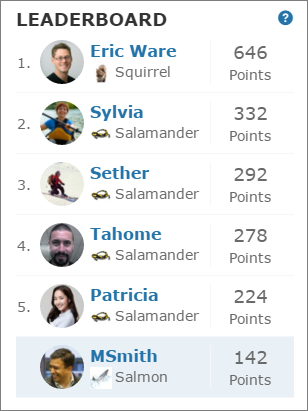
                    <li>If the logged-in user does have rank, the user is
                      highlighted on the leaderboard.</li>

                    <li>If the logged-in user doesn’t rank on the
                      leaderboard, a row for the user appears at the
                      bottom of the leaderboard.</li>

                    <li>If the logged-in user ranks on the leaderboard, AND
                      the Show User Rank checkbox is selected, AND
                      <samp class="parmname">Knowledge and Points</samp> or
                      <samp class="parmname">Knowledge and Last Active</samp> is
                      displayed, the user sees a message about their
                      ranking. For example, “Congratulations! You rank
                      #2.”
                    </li>

                  </ul>
                </td>

              </tr>
              <tr class="">
                <td data-label="Property" class="slds-cell-wrap" style="vertical-align:top;" headers="d40250e55 ">
                  <samp class="parmname">Show help bubble</samp>
                </td>

                <td data-label="Details" class="slds-cell-wrap" style="vertical-align:top;" headers="d40250e58 ">Displays a question mark icon at the top of the
                  leaderboard that a user can hover over to get more
                  info.</td>

              </tr>
              <tr class="">
                <td data-label="Property" class="slds-cell-wrap" style="vertical-align:top;" headers="d40250e55 ">
                  <samp class="parmname">Exclude internal users</samp>
                </td>

                <td data-label="Details" class="slds-cell-wrap" style="vertical-align:top;" headers="d40250e58 ">Excludes internal users from the leaderboard.</td>

              </tr>
              <tr class="">
                <td data-label="Property" class="slds-cell-wrap" style="vertical-align:top;" headers="d40250e55 ">
                  <samp class="parmname">Help Bubble Text</samp>
                </td>

                <td data-label="Details" class="slds-cell-wrap" style="vertical-align:top;" headers="d40250e58 ">Enter the message that appears when a user hovers over
                  the question mark icon. The message can be up to 500
                  characters. The default text is <samp class="parmname">Earn points and
                    climb to new levels when you contribute in the
                    experience!</samp></td>

              </tr>
              <tr class="">
                <td data-label="Property" class="slds-cell-wrap" style="vertical-align:top;" headers="d40250e55 ">
                  <samp class="parmname">Display Users</samp>
                </td>

                <td data-label="Details" class="slds-cell-wrap" style="vertical-align:top;" headers="d40250e58 ">
                  <p>Determines what information about a user shows in the
                    leaderboard. Options include:</p>
                  <ul>
                    <li>Levels and Points—Shows a user’s reputation
                      level and total number of reputation points.</li>
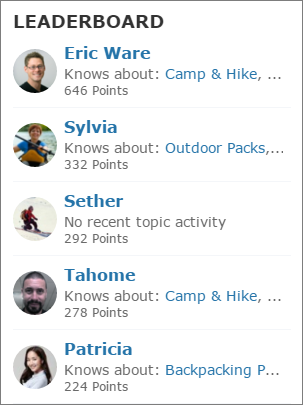
                    <li>Knowledge and Points—Shows a user’s total
                      number of reputation points and topics that they’re
                      knowledgeable about.</li>
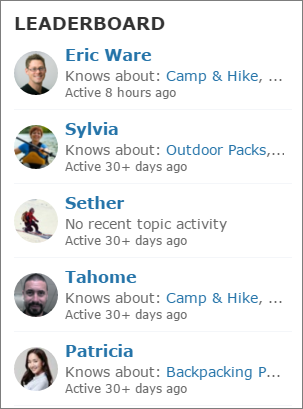
                    <li>Knowledge and Last Active—Shows topics a user
                      is knowledgeable about and when the user was last
                      active.</li>
                  </ul>
                </td>

              </tr>
              <tr class="">
                <td data-label="Property" class="slds-cell-wrap" style="vertical-align:top;" headers="d40250e55 ">
                  <samp class="parmname">Topic Knowledge Label (Up to 20
                    chars.)</samp>
                </td>

                <td data-label="Details" class="slds-cell-wrap" style="vertical-align:top;" headers="d40250e58 ">When Knowledge is shown in the leaderboard, this text
                  appears before the topics a user is knowledgeable about. The
                  default text is <samp class="parmname">Knows about</samp>. For
                  example, if a user is knowledgeable about backpacks, their
                  leaderboard entry can say “Knows about: Backpacks.”</td>

              </tr>
            </tbody>
          </table>

![Example](https://sf-zdocs-cdn-prod.zoominsoftware.com/tdta-experience-communities-264-0-0-production-enus/bf7df212-91a1-4fa3-a007-4d6f3e3b470b/images/icon_example.png)

Example Sample Reputation Leaderboard component: <table class="slds-table slds-table_bordered slds-max-medium-table_stacked slds-m-bottom_small ">
            <colgroup>
              <col style="width:33.33333333333333%">
              <col style="width:33.33333333333333%">
              <col style="width:33.33333333333333%">
            </colgroup>
            <tbody>
              <tr class="">
                <td class="slds-cell-wrap" style="vertical-align:top;">
                  <p><strong>Level and Points</strong></p>
                  <div><img src="https://sf-zdocs-cdn-prod.zoominsoftware.com/tdta-experience-communities-264-0-0-production-enus/bf7df212-91a1-4fa3-a007-4d6f3e3b470b/communities/images/reputation_leaderboard.png" alt="Reputation Leaderboard component"></div>
                </td>
                <td class="slds-cell-wrap" style="vertical-align:top;">
                  <p><strong>Topics and Points</strong></p>
                  <div><img src="https://sf-zdocs-cdn-prod.zoominsoftware.com/tdta-experience-communities-264-0-0-production-enus/bf7df212-91a1-4fa3-a007-4d6f3e3b470b/communities/images/reputation_leaderboard_topics_and_points.png" alt="Reputation leaderboard with topics and points"></div>
                </td>
                <td class="slds-cell-wrap" style="vertical-align:top;">
                  <p><strong>Topics and Last Active</strong></p>
                  <div><img src="https://sf-zdocs-cdn-prod.zoominsoftware.com/tdta-experience-communities-264-0-0-production-enus/bf7df212-91a1-4fa3-a007-4d6f3e3b470b/communities/images/reputation_leaderboard_topics_last_active.png" alt="Reputation leaderboard with topics and last active"></div>
                </td>
              </tr>
            </tbody>
          </table>

#### See Also

- [Which Components Can I Use with Each Aura Template?](https://help.salesforce.com/s/articleView?id=experience.rss_component_reference_table.htm&release=264.0.0&type=5 "Aura site templates, such as Customer Service and Partner Central, are each composed of pages, which in turn are made up of customizable components. Consult this table to find out which Aura template each component can be used in, and when the component became available.")