---
schema_version: "1"
id: 9d58f7755361a9a1ba316b070f45b2449a4ab1ad260f8176a59c537e94ac6f16
title: HTML Editor
collection: admin
version: current
locale: en-us
portal_url: https://docs.salesforce.com/admin/current/en-us/experience/264-0-0/rss_html_editor.md
canonical_url: https://help.salesforce.com/s/articleView?id=experience.rss_html_editor.htm&release=264.0.0&type=5
source_site: help.salesforce.com
content_type: documentation
content_hash: d29cd01d1cc97756f0ecafa8dc48e5c6b0dad5cfe98acc3ca6b2cdd0e91b0393
description: The HTML Editor component lets you create and edit custom content in HTML.
products:
- Experiences
release: "264"
---
# HTML Editor
The HTML Editor component lets you create and edit custom content in HTML.
### Required Editions
Available in: both Salesforce Classic and Lightning Experience
Available in: Enterprise, Performance, Unlimited, and Developer Editions
User Permissions
Needed
To customize or publish an Experience Cloud site:
Create and Set Up Experiences AND View Setup and Configuration AND be a member
of the site
OR
View Setup and Configuration AND be a member of the site AND have appropriate
role-based site access
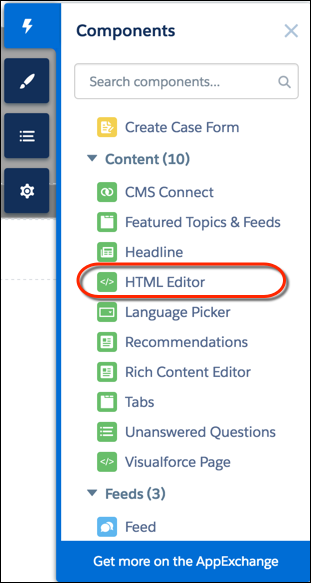
1. In Experience Builder, drag the HTML Editor component from the Components panel onto the page.
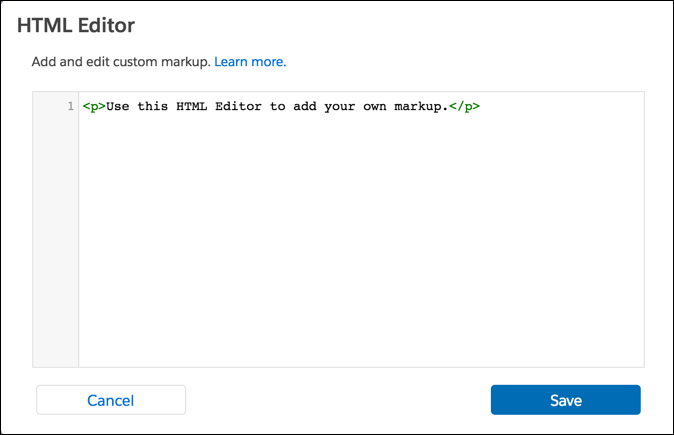
2. Add and format HTML content.
The HTML Editor component supports the following HTML tags and attributes. Any exceptions are flagged in your markup.
Tags: a, abbr, acronym, address, area, article, aside, audio, b, basefont, bdi, bdo, big, blockquote, br, button, canvas, caption, center, cite, code, col, colgroup, datalist, dd, del, details, dfn, dialog, dir, div, dl, dt, em, embed, fieldset, figcaption, figure, font, footer, form, h1, h2, h3, h4, h5, h6, header, hgroup, hr, i, iframe, img, input, ins, kbd, label, legend, li, main, map, mark, menu, meter, noscript, object, ol, optgroup, option, output, p, param, pre, progress, q, rp, rt, ruby, s, samp, section, select, small, span, strike, strong, sub, summary, sup, svg, table, tbody, td, template, textarea, tfoot, th, thead, time, tr, track, tt, u, ul, use, var, wbr, xmp
Attributes: abbr, accept, accept, -charset, accesskey, action, align, alink, allow, allowfullscreen, alt, aria-\*, autocapitalize, autocomplete, autoplay, axis, background, bgcolor, border, capture, cellpadding, cellspacing, char, charoff, charset, checked, cite, class, classid, clear, code, codebase, codetype, color, cols, colspan, compact, content, contenteditable, controls, controls-list, coords, crossorigin, csp, data, data-\*, datetime, declare, decoding, default, defer, dir, dirname, disabled, download, draggable, enctype, face, for, formaction, formenctype, formmethod, formnovalidate, formtarget, frameborder, frameborder, headers, height, hidden, high, href, hreflang, hspace, http-equiv, id, inputmode, is, ismap, itemprop, itemscope, itemtype, kind, label, lang, language, link, list, loop, longdesc, low, marginheight, marginwidth, max, maxlength, media, method, min, minlength, mozallowfullscreen, multiple, muted, name, nohref, noresize, noshade, novalidate, nowrap, open, optimum, pattern, placeholder, poster, preload, pubdate, radiogroup, readonly, rel, required, referrerpolicy, rev, reversed, role, rows, rowspan, rules, sandbox, scheme, scope, scrolling, selected, shape, size, sizes, span, spellcheck, src, srcdoc, srclang, srcset, standby, start, step, style, summary, tabindex, target, text, title, translate, type, usemap, valign, value, valuetype, version, vlink, vspace, webkitAllowFullScreen, width, wrap, xmlns
#### See Also
- [Rich Content Editor](https://help.salesforce.com/s/articleView?id=experience.community_builder_rich_text_component.htm&release=264.0.0&type=5 "The Rich Content Editor component lets you add formatted custom text to your Aura site pages, along with images and videos.")