---
schema_version: "1"
id: cc691414616a29fff53c8b78666434c4be5c99bcc073a2db40d037e3959b4ee1
title: Identify Your Preferred Domain to Improve SEO Results
collection: admin
version: current
locale: en-us
portal_url: https://docs.salesforce.com/admin/current/en-us/experience/264-0-0/networks_seo_preferred_domain.md
canonical_url: https://help.salesforce.com/s/articleView?id=experience.networks_seo_preferred_domain.htm&release=264.0.0&type=5
source_site: help.salesforce.com
content_type: documentation
content_hash: 1882bee460d347018d85bbe9c2c089aa7c74fa5f5692b5c26acfb70ef69298d2
description: By default, your site is available on the *.my.site.com or *.force.com domain, but you can add a custom domain so that your site URLs reflect your company brand. However, multiple domains for the same site, meaning *.my.site.com, *.force.com, and custom domains, can dilute search engine results and lower page ranking. If you have multiple domains, identify which domain to use for crawling and indexing your site’s pages.
products:
- Experiences
release: "264"
---
# Identify Your Preferred Domain to Improve SEO Results
By default, your site is available on the \*.my.site.com or \*.force.com domain, but you can add a custom domain so that your site URLs reflect your company brand. However, multiple domains for the same site, meaning \*.my.site.com, \*.force.com, and custom domains, can dilute search engine results and lower page ranking. If you have multiple domains, identify which domain to use for crawling and indexing your site’s pages.
### Required Editions
Available in: Salesforce Classic and Lightning Experience
Available in: Enterprise, Performance, and Unlimited Editions
Create and Set Up Experiences AND View Setup and Configuration AND be a member
of the site
OR
View Setup and Configuration AND be a member of the site AND have appropriate
role-based site access
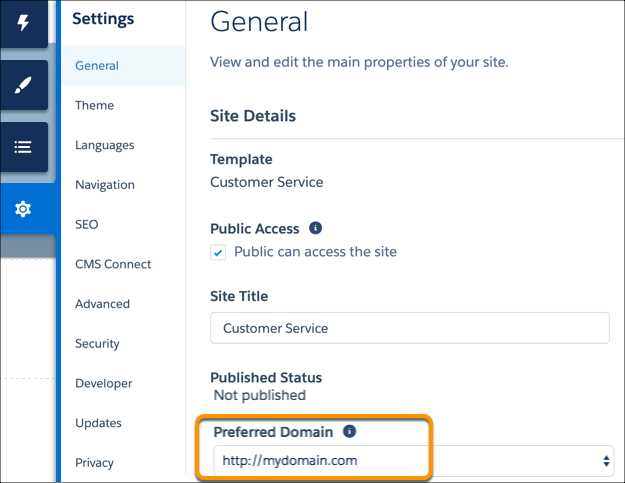
The Preferred Domain setting appears in Experience Builder only if you have multiple domains associated with your Aura or LWR site. For an enhanced LWR site, or for an Aura or LWR site with multiple domains where you haven’t identified a preferred domain, the site’s first custom domain alphabetically is the preferred domain.
1. In Experience Builder, go to **Settings** | **General**.
2. Select your preferred domain.

Note
- Make sure that you configure your preferred domain before submitting the sitemap to a search engine. After your site is public, the search engine shows all the custom URLs that you added to the sitemap.
- You can set only HTTPS preferred domains.
- Issues can occur if you configure preferred domains for two LWR or Aura sites that use the same custom domain with different path prefixes. For example, let’s say you have two sites, https://example.com/site1 and https://example.com/site2. If you configure preferred domains for both sites, then site2 uses the preferred domain for site1. To avoid problems in this scenario, set the Preferred Domain field to None for both sites.
#### See Also
- [Configure a Custom Domain for Your Experience Cloud Site](https://help.salesforce.com/s/articleView?id=experience.networks_custom_domain.htm&release=264.0.0&type=5 "To provide a branded experience for users who access your external-facing Salesforce content, serve your Experience Cloud sites on a domain that you own. With a custom domain, your users access your external-facing Experience Cloud site and its functionality through your branded URL, such as https://www.example.com. Also, with the many-to-many relationship between sites and custom domains, you can serve your external-facing content to meet your branding needs. For example, you can serve content from multiple Experience Cloud sites on one parent website, or serve multiple sites on one domain through custom paths. Because you can serve multiple sites on one domain, custom domains simplify the management of your domains and your corresponding network allowlists. And even if your Salesforce-hosted site URL changes due to a My Domain change, your custom domain remains constant, reducing the number of updates required.")
- [Custom Domains](https://help.salesforce.com/s/articleView?id=platform.domain_mgmt.htm&type=5&language=en_US)
- [Generate a Manual Sitemap Refresh for Your Experience Builder Site](https://help.salesforce.com/s/articleView?id=experience.networks_manual_SEO_sitemap.htm&release=264.0.0&type=5 "When you go live with a new Experience Builder site or make significant updates to an existing one, you can generate a manual sitemap one time every 24 hours outside of the weekly automatic sitemap refresh.")