---
schema_version: "1"
id: 48d988c03dfafe01d121cacec5bc11952475446f6f0c1dffcdf6534bec932214
title: Enable WDC Thanks
collection: admin
version: current
locale: en-us
portal_url: https://docs.salesforce.com/admin/current/en-us/experience/264-0-0/networks_recog_badges_workcom.md
canonical_url: https://help.salesforce.com/s/articleView?id=experience.networks_recog_badges_workcom.htm&release=264.0.0&type=5
source_site: help.salesforce.com
content_type: documentation
content_hash: 2471a8c02d8b0733b443c6fdbf803609ac73527dce6d7b8a3e7ed465d1a16293
description: Recognition Badges are based on the WDC Thanks feature. Enable this feature plus the ability to restrict who can create badges before continuing in your setup.
products:
- Experiences
release: "264"
---
# Enable WDC Thanks
Recognition Badges are based on the WDC Thanks feature. Enable this feature plus the ability to restrict who can create badges before continuing in your setup.
### Required Editions
Available in: Enterprise, Professional, Unlimited, and Developer editions.
User Permissions Needed
To set up the Thanks feature:
Customize Application

Note You don’t need an extra WDC license to set up the Thanks feature.
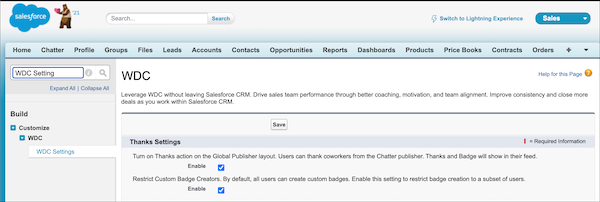
1. In Classic, from Setup, enter WDC Settings in the **Quick Find** box.
2. Select **WDC Settings.**
3. Under **Thanks Setting**, select **Enable** and save. The Restrict Custom Badge Creators option is now available.
4. Under Restrict Custom Badge Creators, select **Enable**, and save.