---
schema_version: "1"
id: 7b967f5957be70a741aad0947fa3627f5d20fa193c8e6884360e874404ead845
title: Use Components to Display Assigned Recognition Badges on Member Profiles
collection: admin
version: current
locale: en-us
portal_url: https://docs.salesforce.com/admin/current/en-us/experience/264-0-0/networks_recog_badges_components.md
canonical_url: https://help.salesforce.com/s/articleView?id=experience.networks_recog_badges_components.htm&release=264.0.0&type=5
source_site: help.salesforce.com
content_type: documentation
content_hash: ef9c53b726f1940043348882484937ee2aaa2872cd89b5729c940310c9f984b0
description: Use the User Profile component or the Recognition Badge component to display assigned Recognition Badges on a member’s profile.
products:
  - Experiences
release: "264"
---
# Use Components to Display Assigned Recognition Badges on Member Profiles

Use the User Profile component or the Recognition Badge component to display assigned Recognition Badges on a member’s profile.

### Required Editions

<table class="slds-table slds-table_bordered slds-max-medium-table_stacked slds-m-bottom_small edition"><colgroup><col></colgroup><tbody><tr class=""><td class="slds-cell-wrap" style="vertical-align:top;">Available in: <strong>Enterprise</strong>, <strong>Professional</strong>, <strong>Unlimited</strong>, and <strong>Developer</strong> editions.</td></tr></tbody></table>

<table class="slds-table slds-table_bordered slds-max-medium-table_stacked slds-m-bottom_small permission">
        <colgroup>
          <col style="width:50%">
          <col style="width:50%">
        </colgroup>
        <thead class="slds-text-title_caps ">
          <tr class="">
            <th scope="colgroup" class="slds-cell-wrap" colspan="2" style="text-align:center;vertical-align:top;" id="d55622e64">User Permissions Needed</th>
          </tr>
        </thead>
        <tbody>
          <tr class="">
            <td data-label="User Permissions Needed" class="slds-cell-wrap" style="vertical-align:top;" headers="d55622e64 ">To manage page components:</td>

            <td class="slds-cell-wrap" style="vertical-align:top;" headers="d55622e64 ">Create And Set Up Experiences</td>

          </tr>
        </tbody>
      </table>

You can either use the User Profile component or the Recognition Badges component to allow assigned badges to display on a member’s profile page.

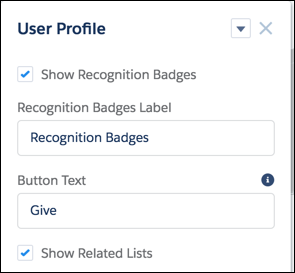
1. In the User Profile component, select **Show Recognition Badges**.
    
    ![User Profile component with Show Recognition Badges selected.](https://sf-zdocs-cdn-prod.zoominsoftware.com/tdta-experience-communities-264-0-0-production-enus/bf7df212-91a1-4fa3-a007-4d6f3e3b470b/communities/images/recog_badges_profile_component.png)
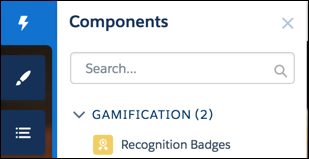
2. Alternatively, drag the Recognition Badges component onto the profile page.
    
    ![Components list with Recognition Badges component under Gamification.](https://sf-zdocs-cdn-prod.zoominsoftware.com/tdta-experience-communities-264-0-0-production-enus/bf7df212-91a1-4fa3-a007-4d6f3e3b470b/communities/images/recog_badges_component.png)