---
schema_version: "1"
id: f39b087baec19fb9de23624ca7d5f0dd6bd0df1921393ab1c85e91626ce5a4fa
title: Display Unearned Mission Badges
collection: admin
version: current
locale: en-us
portal_url: https://docs.salesforce.com/admin/current/en-us/experience/264-0-0/networks_missions_display_unearned.md
canonical_url: https://help.salesforce.com/s/articleView?id=experience.networks_missions_display_unearned.htm&release=264.0.0&type=5
source_site: help.salesforce.com
content_type: documentation
content_hash: 1e0e9190eaab146d2b1ae4b2ce62db6464fa721c716935bb956777ba6b909f6b
description: Inspire members to participate more in your Experience Cloud site by showing them the badges they can earn. You can display the unearned badges in the member’s recognition badges list.
products:
- Experiences
release: "264"
---
# Display Unearned Mission Badges
Inspire members to participate more in your Experience Cloud site by showing them the badges they can earn. You can display the unearned badges in the member’s recognition badges list.
### Required Editions
Available in: Enterprise, Professional, Unlimited, and Developer editions.
User Permissions Needed
To edit page components:
Create and Set Up Experiences AND View Setup and Configuration

Note
- To use Missions, set up Recognition Badges.
- Missions count activities that occurred before the missions were set up. You can reset the count when you create your mission, but be aware that this resets all the activity counters.
1. In Experience Builder, open the Badge Received Related List page.
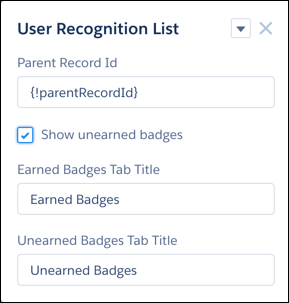
2. Click the User Recognition List component.
3. Select **Show unearned badges**.