---
schema_version: "1"
id: 630dcb1db0ff41aa5b57d51855abe2430988a564474a9df4bb26f2aecfb7bc5f
title: Customize the Headless Registration Email Template
collection: admin
version: current
locale: en-us
portal_url: https://docs.salesforce.com/admin/current/en-us/experience/264-0-0/networks_headless_registration_email.md
canonical_url: https://help.salesforce.com/s/articleView?id=experience.networks_headless_registration_email.htm&release=264.0.0&type=5
source_site: help.salesforce.com
content_type: documentation
content_hash: 553052513f0b94cda3f2916fa4b8a33e192c9681d0951cea5177980ee200d404
description: When you configure headless registration for an off-platform app, you can customize the one-time password (OTP) email that users receive to verify their identity. Edit the default email template to match your company’s branding. Keep in mind that this email template is only for headless registration in an app outside of the Salesforce platform. It isn’t designed for users registering or logging in to an Experience Cloud site.
products:
- Experiences
release: "264"
---
# Customize the Headless Registration Email Template
When you configure headless registration for an off-platform app, you can customize the one-time password (OTP) email that users receive to verify their identity. Edit the default email template to match your company’s branding. Keep in mind that this email template is only for headless registration in an app outside of the Salesforce platform. It isn’t designed for users registering or logging in to an Experience Cloud site.
### Required Editions
Available in: both Salesforce Classic (not available in all orgs) and Lightning Experience
Available in: Enterprise, Unlimited, and Developer Editions
User Permissions
Needed
To customize or publish an Experience Cloud site:
Create and Set Up Experiences AND View Setup and Configuration AND be a member
of the site
OR
View Setup and Configuration AND be a member of the site AND have appropriate
role-based site access
1. From Setup, in the Quick Find box, enter Sites, and then select **All Sites**. Next to the Experience Cloud site for your Headless Identity implementation, click **Workspaces**.
2. Select **Administration**, and then select **Emails**.
3. Under Email Templates, next to One-Time Password for Headless Registration, click , and then select **Experience Cloud: One-Time Password Email for Headless Registration Verification**.
4. Save your changes.
5. To customize the email, edit the template.
1. From Setup, enter Email Templates in the Quick Find box, and select **Classic Email Templates**.
2. Next to Experience Cloud: One-Time Password Email for Headless Registration Verification, select **Edit**.
3. Edit the text in the email body.

Important Don’t remove `{!Verification_Code}`.
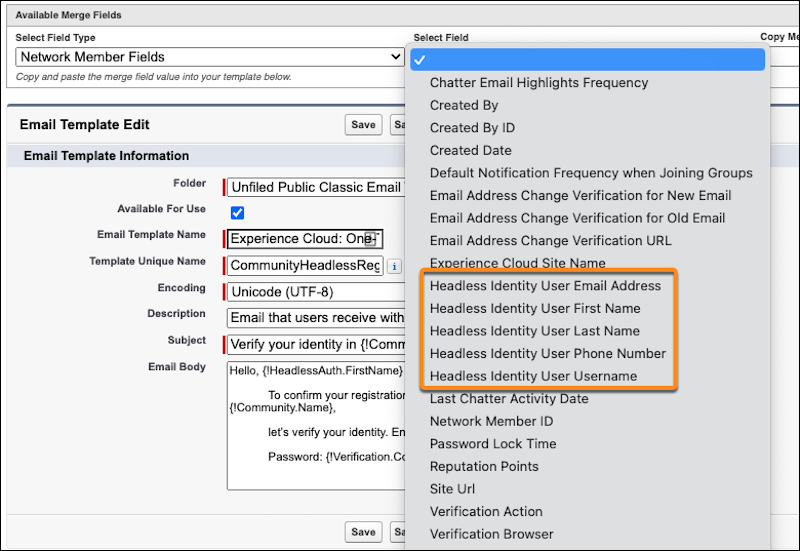
4. To add more fields to the email, copy merge field values into the template. Under Available Merge Fields, select a field type, select a field, and then copy and paste the merge field value into the email body.
For merge fields specific to Headless Identity, select **Network Member Fields** for the field type.
5. Save your changes.