---
schema_version: "1"
id: 748e6b49ca1982008a5992ed099b69e7ac03679a2db0d7863464d8cd695791d0
title: Bind Data to CRM Record Detail Pages in Your LWR Site
collection: admin
version: current
locale: en-us
portal_url: https://docs.salesforce.com/admin/current/en-us/experience/264-0-0/networks_data_binding_crm_data.md
canonical_url: https://help.salesforce.com/s/articleView?id=experience.networks_data_binding_crm_data.htm&release=264.0.0&type=5
source_site: help.salesforce.com
content_type: documentation
content_hash: 1db4047ce0efd9d098e4afa411a62b97852fa7ad5a3d6ea6204531f0bcd43186
description: Data-bound components used on CRM record detail pages automatically populate with content saved in Salesforce CRM data in records. Map fields in the component property panel to fields in the CRM records.
products:
- Experiences
release: "264"
---
# Bind Data to CRM Record Detail Pages in Your LWR Site
Data-bound components used on CRM record detail pages automatically populate with content saved in Salesforce CRM data in records. Map fields in the component property panel to fields in the CRM records.
### Required Editions
Available in: Salesforce Classic and Lightning Experience
Available in: Enterprise, Performance, Unlimited, and Developer Editions
Be a member of the site AND Create and Set Up Experiences
OR
Be a member of the site AND an experience admin, publisher, or builder in that
site
1. In Experience Builder, navigate to a detail page such as Record Detail, and click **Components**.
2. Drag a component that supports data binding, such as Banner, Card, Grid, Overlap, and Tile, onto the page. In the component property panel, you already have content inherited from the content pages (1).

Note The Grid component can be added to any type of site page in addition to Record Detail pages
3. In the component property panel, map the fields in the record to fields in the object detail page (2). You can bind data from any field on the detail page, including custom fields.
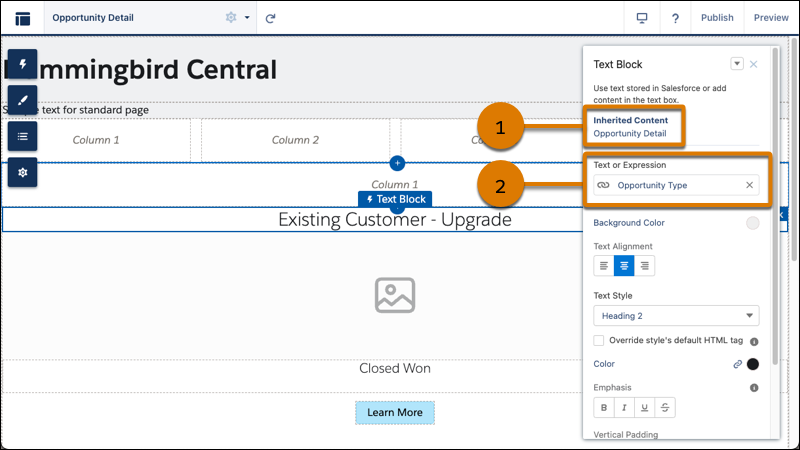
To use a component on a detail page without binding content, click the chain link icon next to the data source to unlock the content. Add your own content, or paste in a valid URL in the field to link to static content.
To see data binding in CRM records in action, check out the [Did You Know Series (English Only)](https://salesforce.vidyard.com/watch/SUwcxSKrE2tNUXeBqtNWFG).
#### See Also
- [Use a Grid Component to Show Enhanced CMS Collections and List Views in LWR Sites](https://help.salesforce.com/s/articleView?id=experience.networks_grid.htm&release=264.0.0&type=5 "The Grid component dynamically populates with data that’s saved in enhanced CMS collections and record list views. After you pick a data source, you add a content component within the grid to show the content that you want. The component provides data binding and pagination logic.")