---
schema_version: "1"
id: 7b89bb5ca9b5a9720743b92090069da5d3126132939b1f116911294ecfcebd86
title: Archive a Site
collection: admin
version: current
locale: en-us
portal_url: https://docs.salesforce.com/admin/current/en-us/experience/264-0-0/networks_archive_site.md
canonical_url: https://help.salesforce.com/s/articleView?id=experience.networks_archive_site.htm&release=264.0.0&type=5
source_site: help.salesforce.com
content_type: documentation
content_hash: caa905c89256f1480eb40230ff62276fe5bf263b10a4e10a688a77e23274e802
description: Archive an inactive site so that users can no longer access it. You must deactivate a site before you can archive it.
products:
- Experiences
release: "264"
---
# Archive a Site
Archive an inactive site so that users can no longer access it. You must deactivate a site before you can archive it.
### Required Editions
Available in: Salesforce Classic and Lightning Experience
Available in: Enterprise, Performance, Unlimited, and Developer Editions
Be a member of the site AND Create and Set Up Experiences
1. Open the Digital Experiences app from the App Launcher.

Note To update visibility and tab settings for profiles you want to have access to the Digital Experiences app and the All Sites page, see [Enable Access to the Digital Experiences App](https://help.salesforce.com/s/articleView?id=xcloud.community_managed_content_start_using.htm&type=5&language=en_US).
2. Click **View All** in All Sites.
3. Click the name of the site you want to archive.
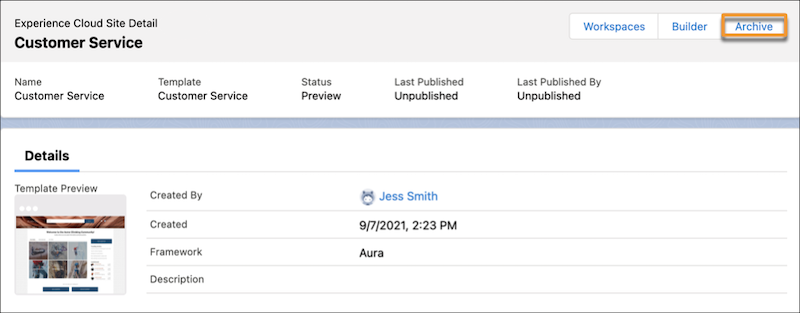
4. On the site detail page, click **Archive**.
5. Click **Archive** again.
Your site is archived. If you change your mind, you can unarchive it. However, if you discontinue a license for a product that you no longer use, for example a B2B or D2C Commerce license, you must deactivate and archive any site that depends on that license, such as a storefront.
- **[Considerations for Archiving a Site](https://help.salesforce.com/s/articleView?id=experience.networks_archive_sites_considerations.htm&release=264.0.0&type=5)**
Before you archive a site, consider what types of sites can be archived, and the impact that archiving might have on users.
#### See Also
- [Deactivate Your Site](https://help.salesforce.com/s/articleView?id=experience.networks_unpublish.htm&release=264.0.0&type=5 "Deactivate your site when you add or remove members; add, remove, or rearrange tabs; change the color scheme; or change the URL. You also must deactivate a site before you can archive it.")