---
schema_version: "1"
id: 4ead717011e5b1f6ae4a4d452824e565ebd10118f995bf5361a7b0f6c1f8a0b9
title: Customize the Theme of Your Experience Builder Site
collection: admin
version: current
locale: en-us
portal_url: https://docs.salesforce.com/admin/current/en-us/experience/264-0-0/community_builder_theme_customize.md
canonical_url: https://help.salesforce.com/s/articleView?id=experience.community_builder_theme_customize.htm&release=264.0.0&type=5
source_site: help.salesforce.com
content_type: documentation
content_hash: 8949a47a42c98ae4acec8e451bc5c4e4a515b87a6cb9f30242dfffc156d088c1
description: Customize the theme of your Experience Builder site by adjusting everything from the size and color of your headers and footers, to the fonts and colors for active text. We can get you started, but you get to make the final tweaks to make the theme your own.
products:
- Experiences
release: "264"
---
# Customize the Theme of Your Experience Builder Site
Customize the theme of your Experience Builder site by adjusting everything from the size and color of your headers and footers, to the fonts and colors for active text. We can get you started, but you get to make the final tweaks to make the theme your own.
### Required Editions
Available in: both Salesforce Classic and Lightning Experience
Available in: Enterprise, Performance, Unlimited, and Developer Editions
User Permissions
Needed
To customize or publish an Experience Cloud site:
Create and Set Up Experiences AND View Setup and Configuration AND be a member
of the site
OR
View Setup and Configuration AND be a member of the site AND have appropriate
role-based site access
Every pre-built theme is loaded with options to help you achieve the style you want without ever dealing with code. And we remember how you set up each theme so you can change between them easily.
If you previously customized a pre-built theme, when you reactivate it you can decide to use your current settings or replace them and start over.
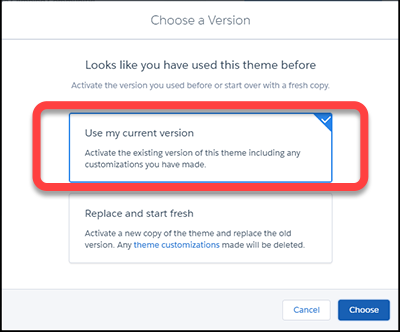

Note Using either **Reset** or **Replace and start fresh** deletes all of your customizations.
- Branding sets
- Theme regions (settings for common elements across pages like headers)
- Theme settings
- Custom theme layouts
- Custom theme layout assignments for pages
- Custom CSS overrides
These settings aren’t retrievable, so be careful about selecting either **Reset** or **Replace and start fresh**.
Changing themes preserves your content, but a new theme doesn’t necessarily display your content in a useful or desirable manner. After a change, always reconfirm that your site still works the way you want it to.
- **[Adjust the Style and Layout of Your Site Theme](https://help.salesforce.com/s/articleView?id=experience.community_builder_theme_adjust.htm&release=264.0.0&type=5)**
Experience Builder sites include several pre-built themes that you can modify easily. In addition to customizing the layouts, you can configure colors, fonts, images, sizes, and actions with a ton of choices and levers.
- **[Theme Guidance: Header Components](https://help.salesforce.com/s/articleView?id=experience.community_builder_theme-g-header.htm&release=264.0.0&type=5)**
Headers provide context and easy navigation throughout a site.
- **[Theme Guidance: Hero Component](https://help.salesforce.com/s/articleView?id=experience.community_builder_theme-g-hero.htm&release=264.0.0&type=5)**
Hero images are large images that are designed to dominate the visual field of a page and grab attention.
- **[Theme Guidance: Search Component](https://help.salesforce.com/s/articleView?id=experience.community_builder_theme-g-search.htm&release=264.0.0&type=5)**
Multiple search components and placement options give you flexibility to design the right experience for your customers.
- **[Custom Theme Layouts and Theme Layout Components](https://help.salesforce.com/s/articleView?id=experience.community_builder_theme.htm&release=264.0.0&type=5)**
Theme layouts and theme layout components combine to give you granular control of the appearance and structure of each page in your site. Customize the layout’s header and footer to match your company’s style. Configure theme layout properties. Or use a custom search bar and user profile menu. Then use theme layouts to assign theme layout components to individual pages allowing you to quickly change layouts from one central location. Whether you’re a consulting partner or an ISV, or you simply want to revamp your own site, custom theme layouts make it easy to rebrand.
#### See Also
- [Developer Guide: Build a Condensed Theme Layout Component](https://developer.salesforce.com/docs/atlas.en-us.communities_dev.meta/communities_dev/communities_dev_example.htm)
- [Trailhead: Create a Custom Theme Layout Component](https://trailhead.salesforce.com/en/projects/communities_theme_layout/steps/create_component)