---
schema_version: "1"
id: b8d91026b225e699d955e22a13316e97390d0b19c96274feace0248ecd58b1ea
title: "Theme Guidance: Header Components"
collection: admin
version: current
locale: en-us
portal_url: https://docs.salesforce.com/admin/current/en-us/experience/264-0-0/community_builder_theme-g-header.md
canonical_url: https://help.salesforce.com/s/articleView?id=experience.community_builder_theme-g-header.htm&release=264.0.0&type=5
source_site: help.salesforce.com
content_type: documentation
content_hash: 9709c5dbaaec2d70227eb7df51750bdf37cefff4f9a236facea67bf484cbfbd0
description: Headers provide context and easy navigation throughout a site.
products:
- Experiences
release: "264"
---
# Theme Guidance: Header Components
Headers provide context and easy navigation throughout a site.
### Required Editions
Available in: both Salesforce Classic and Lightning Experience
Available in: Enterprise, Performance, Unlimited, and Developer Editions
User Permissions
Needed
To customize or publish an Experience Cloud site:
Create and Set Up Experiences AND View Setup and Configuration AND be a member
of the site
OR
View Setup and Configuration AND be a member of the site AND have appropriate
role-based site access
## One Header, Lots of Controls
Headers have many options and controls for changing the look and feel of a page. Options and controls include the height, color, transparency, and even whether it stays fixed to the top of the screen while customers scroll. Combining adjustments to your header with adjustments to your hero section, if you use it, offers usability, variation, and visual interest. Explore the components property panel for your header and **Theme Settings** in your Theme panel.
## Different Headers for Different Types of Pages in the Same Site
It’s common to have a different layout for your login page. Many pre-built themes have different options for the login, home, and other pages. A change to the header on the home page, for instance, isn’t necessarily reflected on your content or login pages. If you employ different theme layouts, configure the changes for each variation separately, as you did in previous releases.
## Changing the Logo
If you already set a logo for your site, it’s recognized and used by pre-built themes. If you haven’t set a logo in the past or want to update your current choice, use the Images area of the Theme panel.
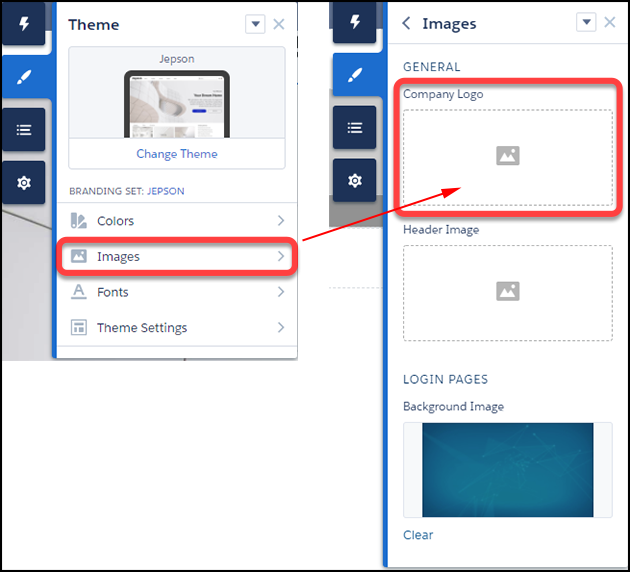
Branding sets let you apply different logos to different variations of your site or for different audiences and occasions.

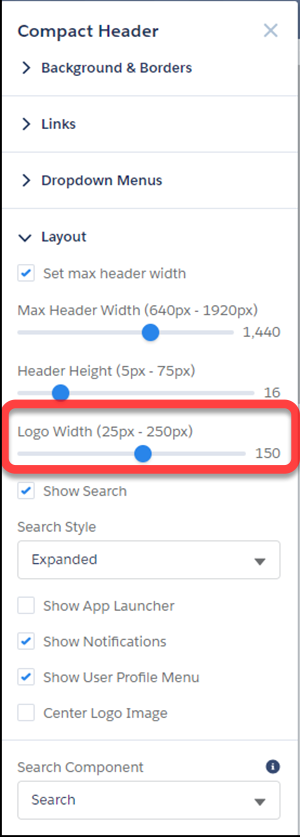
Note We try to resize your logo to fit the header. But you can adjust the size manually in the header component properties panel, using **Logo Width** in the Layout section. Your logo proportionally resizes relative to the width selected.
## Header and Hero Interaction
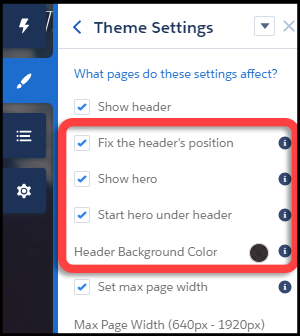
- When "Fix the header's position" and "Start hero under header" are both enabled in **Theme Settings**, choose a background color for best visibility. If you leave the background transparent, menu items can become invisible when a customer scrolls down the page. Menu items can be hidden because the hero image has scrolled out of view. A solid background color avoids this problem.
## Audience Targeting
The new theme components (for example, Compact Header) don’t currently support component-level targeting (visibility). However, with a little effort, it’s still possible to set up targeting.
- Create a custom theme layout in Experience Builder **Settings** | **Theme** | **Configure**.
- Create a page variation.
- Assign the new theme layout to your page variation (via Page Properties).
## Finding the Right Controls
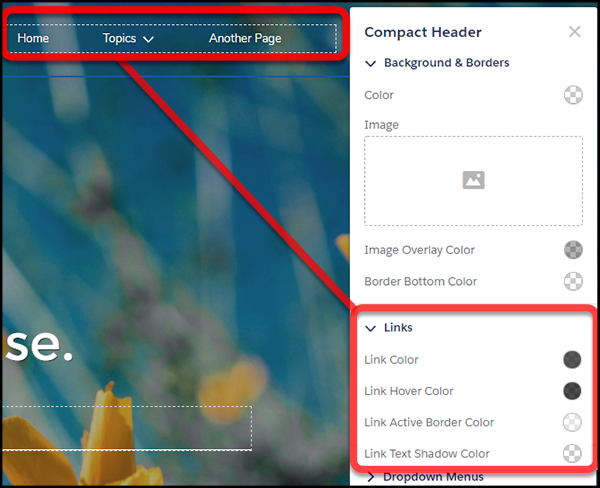
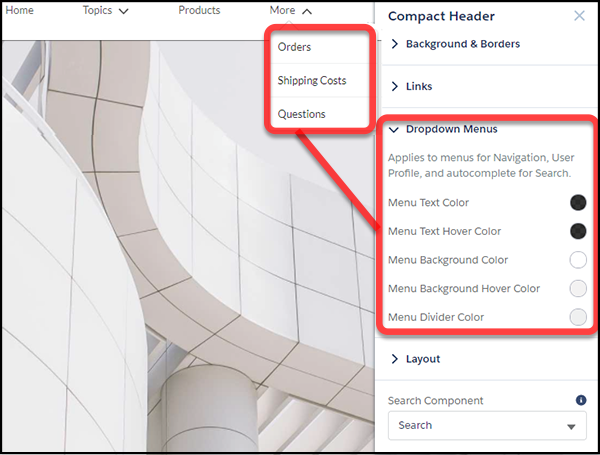
With so many options, it can be easy to miss which control affects which part of your header.
Menu text color formats the options that appear on dropdown menus, like profile menus, navigation menus, and search deflection. Link color formats link text and icons that are visible in the header.
## Mobile Display
Specific aspects of the theme component properties, such as header height, are hard-coded for mobile devices using the Salesforce Lightning Design $mq-small media-query. The setting results in a maximum width of 47.9375 em.