---
schema_version: "1"
id: f05892de6988d743353fd80fe0d66f74d1930fab3edf1624826d040e7525cf92
title: Custom Lightning Components
collection: admin
version: current
locale: en-us
portal_url: https://docs.salesforce.com/admin/current/en-us/experience/264-0-0/community_builder_custom_lightning_components.md
canonical_url: https://help.salesforce.com/s/articleView?id=experience.community_builder_custom_lightning_components.htm&release=264.0.0&type=5
source_site: help.salesforce.com
content_type: documentation
content_hash: 0d925d2e96eced21c2eff78e3022d01775226980244d6c7be511a19e29096eab
description: Build your own custom Lightning components to use in Experience Builder sites.
products:
- Experiences
release: "264"
---
# Custom Lightning Components
Build your own custom Lightning components to use in Experience Builder sites.
### Required Editions
Available in: both Salesforce Classic and Lightning Experience
Available in: Enterprise, Performance, Unlimited, and Developer Editions
User Permissions
Needed
To customize or publish an Experience Cloud site:
Create and Set Up Experiences AND View Setup and Configuration AND be a member
of the site
OR
View Setup and Configuration AND be a member of the site AND have appropriate
role-based site access

Note As of API version 45.0, you can build Lightning components using two programming models: Lightning Web Components, and the original model, Aura Components.
To develop custom Aura components for your Experience Builder site, see [Experience Cloud Developer Guide: Configure Drag-and-Drop Components for Experience Builder](https://developer.salesforce.com/docs/atlas.en-us.communities_dev.meta/communities_dev/components_config_for_builder.htm).
To develop custom Lightning web components for your Experience Builder site, see [Lightning Web Components Developer Guide: Configure a Component for Experience Builder](https://developer.salesforce.com/docs/component-library/documentation/lwc/lwc.use_config_for_community_builder). You can’t incorporate Lightning web components with the 2 column, 2:1 ratio, split-sidebar fixed page layout that’s available in Experience Builder. Use a flexible layout to create a page or page variation in Experience Builder that’s arranged the same way.
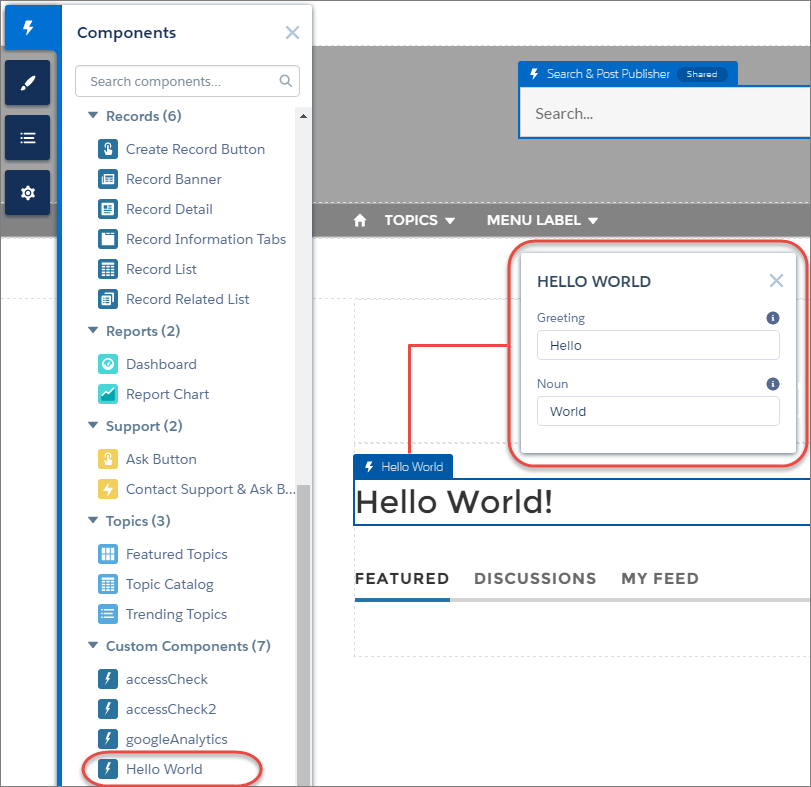
Custom Lightning components configured for Experience Builder sites behave just like standard template components. Drag the component to the page canvas. To edit its properties, select the component on the page canvas, and then enter changes in the floating component property editor.
Custom components appear in the Components panel along with your template’s components.

Example
A custom component added to the page canvas, with properties open in the property editor:
#### See Also
- [Create a Flexible Layout](https://help.salesforce.com/s/articleView?id=experience.community_builder_flexible_layout.htm&release=264.0.0&type=5 "Build highly customized pages using flexible layouts. Create and resize columns within each section, then add and stack sections to build out the page. Bring it all to life with background images and color.")
- [Change the Content Layout in Experience Builder](https://help.salesforce.com/s/articleView?id=experience.community_builder_change_layout.htm&release=264.0.0&type=5 "Quickly change the look of your Experience Builder site pages by switching to a different content layout. You can even create your own custom content layout components in the Developer Console and import them to use in your site.")